
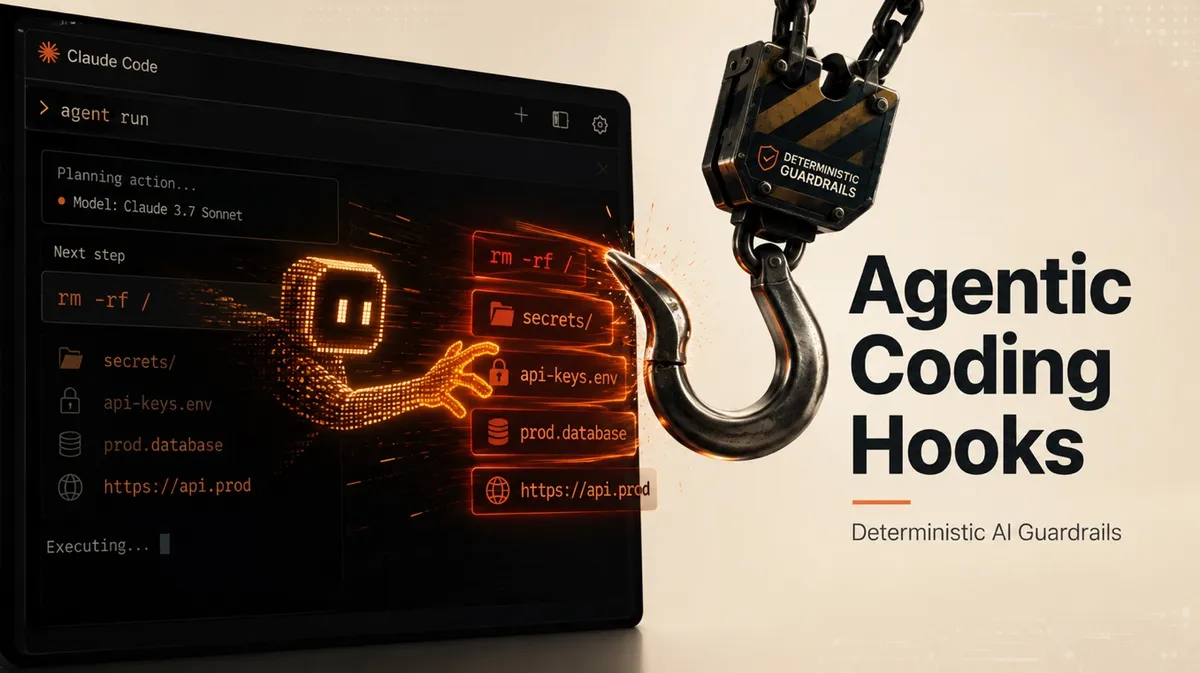
We steer our coding agents with AGENTS.md files, rules and skills, and most of the time they listen. The trouble is that most of the time is a probability, not a guarantee. Some actions must never happen, no matter how the model reads your instructions in a given session. That holds anywhere the agent can reach, whether it is your repository, your environment, your data or a production endpoint.
In this post you will learn what agent hooks are and how they add a deterministic layer of guardrails to your AI coding workflow. We will focus on Claude Code, which offers the most advanced hooks implementation today, and review its lifecycle events, handler types and placement levels. We will then go over practical guardrail use cases, and look at how other coding agents and IDEs, not just Claude Code, are adopting the same idea.
The Problem: AI Agent Instructions Are Probabilistic
Everything you feed an LLM-based agent through its context window is, in the end, a suggestion. Your CLAUDE.md conventions, your skills and your prompts compete for the model's attention, and compliance tends to drop as sessions grow longer. That is fine for code style preferences, but it becomes a real problem when the instruction protects something critical, such as a secrets folder, a production configuration file or a CI/CD standard your organization depends on.
You might think the fix is simply to write better instructions, and to a point it is. In Claude Code Best Practices: Lessons From Real Projects I argued that encoding your domain expertise into the agent's context is one of the highest-impact things you can do, and I still believe it. Even so, instructions are never deterministic, and nothing guarantees the model will honor them on a given turn. For the cases where a rule has to hold every single time, hooks add the determinism that prompts or skills cannot, and that is exactly what they are built for.
What Are Agent Hooks?
Hooks are user-defined shell commands, HTTP endpoints, or LLM prompts that execute automatically at specific points in Claude Code’s lifecycle. — Claude Code hooks documentation
Hooks are user-defined handlers, usually shell scripts, that the agent runtime executes automatically at specific points in its lifecycle. What makes hooks useful is that the model doesn't get to decide whether your code runs. The runtime does. A hook is just regular code, so it runs the same way every time. That makes it a deterministic counterweight to the agent's non-deterministic nature.
A hook can have several implementations. It can be a shell script. It can also be an HTTP endpoint that receives the event over the network, or an LLM prompt that asks a fast model to judge a condition in plain language. Both come with strings attached. An HTTP hook depends on a network call that can time out or fail, and its error handling is far less clear-cut. An LLM prompt hook is non-deterministic by nature, so the predictable, identical answer that a guardrail depends on is exactly what it cannot promise. That is why shell script hooks are the best tool for the job, and why I will stay with them throughout this post: they run locally and give you the most power and control to enforce exactly what you want.
Hooks subscribe to events. Claude Code fires hook events at three cadences, as the diagram below illustrates. Some events fire once per session, such as SessionStart and SessionEnd. Others fire once per conversation turn, such as UserPromptSubmit when you send a prompt and Stop when Claude finishes responding. The most useful ones fire on every tool call inside the agentic loop: PreToolUse runs before a tool executes and PostToolUse runs right after it succeeds.
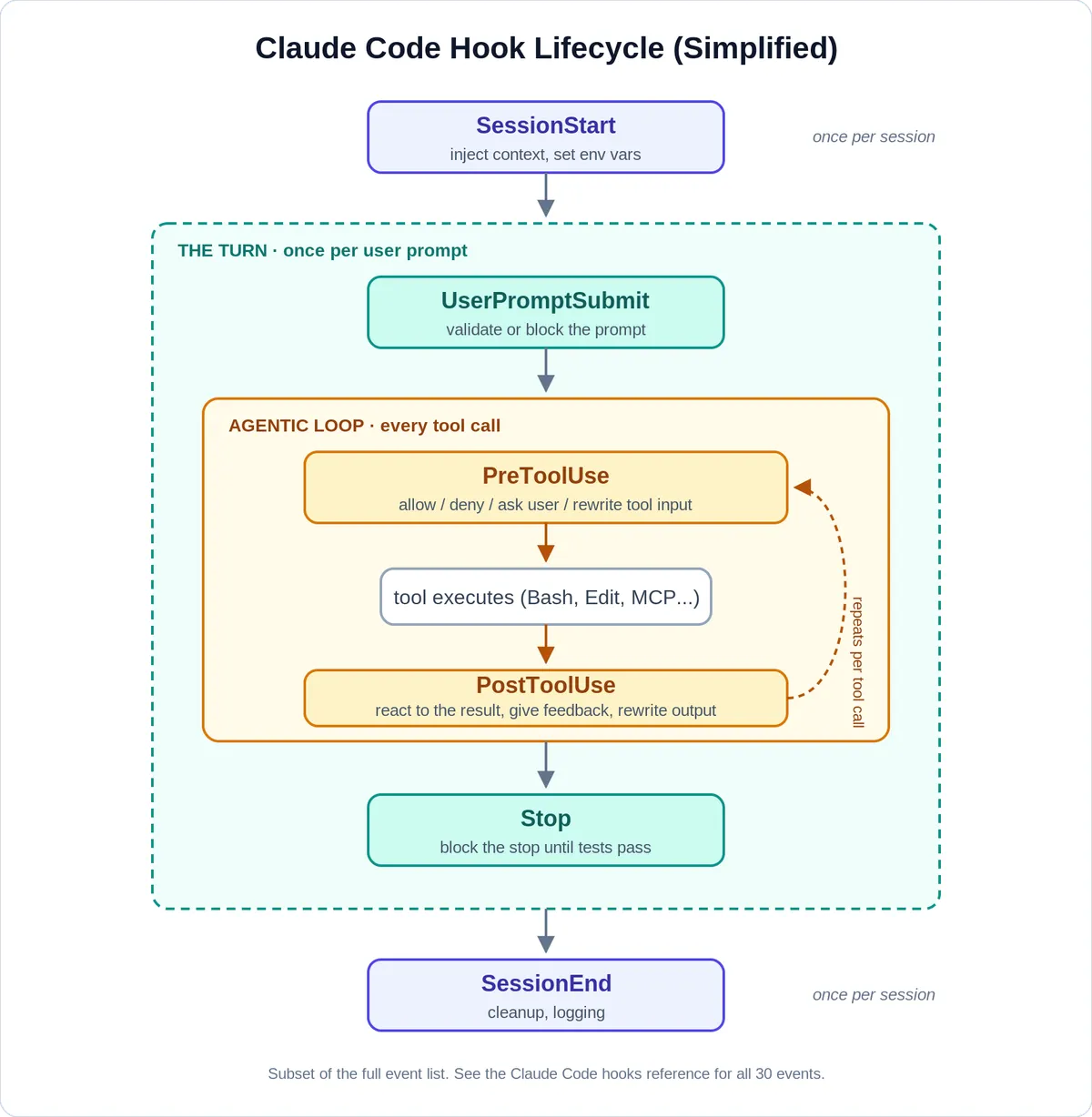
PreToolUse is where the guardrail value is. Your hook receives the full tool call as JSON, including the exact Bash command or the file path about to be touched, before anything executes. It can allow the call, deny it with a reason that gets fed back to the model, escalate to you with a permission prompt, or even rewrite the tool input before it runs. PostToolUse closes the loop on the other side and lets you react to what just happened, for example by running a linter on the edited file and pushing the failures back into the conversation. One nuance is important here: a denied PreToolUse is a hard stop, since the tool call simply never executes, while a blocked Stop feeds your reason back to the model and asks it to continue, so treat it as a strong nudge rather than an absolute guarantee. Claude Code fires many other events too, but for the guardrails in this post PreToolUse and PostToolUse are the only ones I will need, and PreToolUse carries most of the weight because it can allow or block an action before it runs.
Now that we understand the concept, let's see how much depth the Claude Code implementation actually offers.
Claude Code Hooks: Events, Handler Types and Levels
The official hooks reference currently documents thirty events in total, covering permission requests, subagent lifecycle, context compaction, configuration changes and even watching files on disk.
PreToolUse is the event that does the real guardrail work, since it fires before a tool runs and can stop it. A hook receives the tool call as JSON on stdin and can decide in two ways. The blunt path is the exit code: exit 2 blocks the call and feeds your stderr back to the model as the reason, while exit 0 reports no decision and lets the call continue. The more expressive path is to exit 0 and print a hookSpecificOutput block with a permissionDecision of allow, deny or ask, so the same script can approve a call, block it with an explanation, or hand the choice back to you.
The two are alternatives, since Claude Code only reads the JSON when the script exits 0, and that drives the tradeoff. A malformed JSON deny, say a stray line from your shell profile on stdout, is never parsed and the call slips through, so it fails open, while exit 2 blocks whatever your stdout looks like and fails closed. For the critical few where a command must never run I lean on exit 2 for that reliability, and reach for JSON when a clear message or a softer outcome matters more. exit 2 also means different things depending on the event it runs on - check the exit code behavior for each event before relying on it.
Here is the smallest useful example, adapted from the official Claude Code hooks documentation. A PreToolUse hook on Bash, registered in .claude/settings.json, points at a script:
On each matching Bash call, the hook receives the tool call as JSON on standard input, with fields like these:
The script reads the command from stdin and, on a match, returns a permissionDecision of deny, which is the deny path in the figure below:
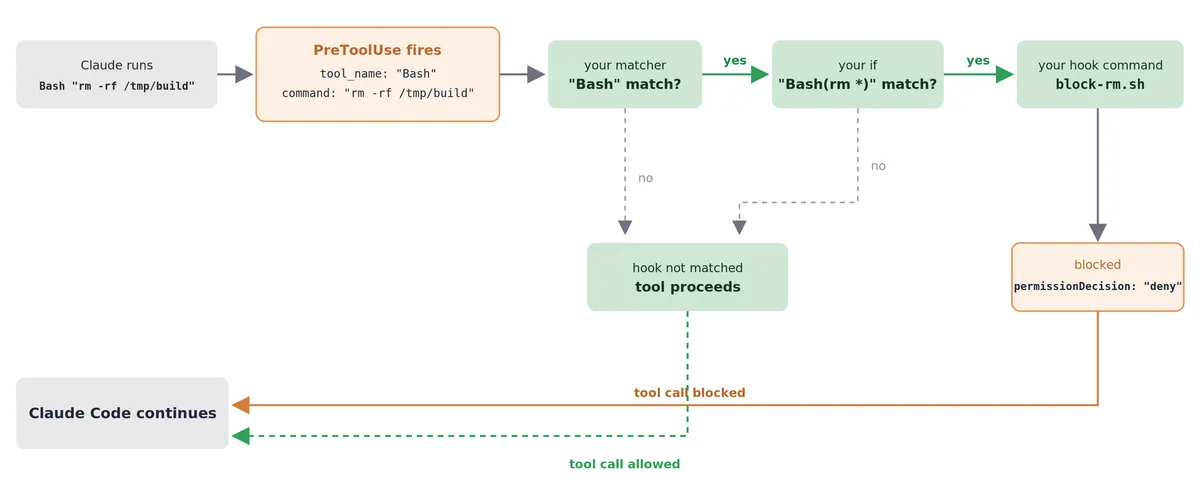
PreToolUse hook resolves the rm -rf example, recreated from the official Claude Code hooks documentation.Where you place a hook matters just as much as what it does. Hooks live in your user settings for personal, machine-wide behavior, in the project's .claude/settings.json where they are committed and shared with the whole team and in managed policy settings that administrators control across the organization. The placement is effectively the scope of your policy: a personal safety net belongs at the user level, a team CI standard belongs in the repository, and an organizational guardrail belongs in managed settings that an administrator controls. Because a hook is code that runs on its own, where it lives is also a security question, which is exactly what we turn to next.
Practical Guardrail Use Cases for AI Coding Agents
So what do people actually do with all of this? The most popular hook in the community is also the most mundane: a PostToolUse hook that runs a formatter and linter after every file edit, so the agent's output always lands clean. From there, the use cases climb up the criticality ladder. PreToolUse hooks match Bash commands against patterns and block the dangerous ones, such as recursive deletes, for commands that touch infrastructure. This is not theoretical: one developer published a collection of safety hooks after Claude Code tried to run rm -rf ~/, exactly what a PreToolUse hook stops before it runs. File access hooks keep the agent out of .env files, secrets and production config, which matters because another developer watched his agent copy production credentials into a file that got committed to GitHub.
Hooks Are Code, So Guard Your Settings Files
A hook is not a passive setting. It is code the runtime executes automatically with your permissions, and a SessionStart hook runs the moment you open a project, before you type anything. That is what makes a settings file worth defending: whoever controls the file controls what runs on your machine. In April 2026 a PyPI worm planted a malicious SessionStart hook in repository settings, so merely opening the project executed the payload. Anything that can write to that file, from a bad dependency to an unreviewed pull request, can plant a hook the agent runs for you.
So read the settings hierarchy from the least trusted file to the most. The project file, .claude/settings.json, is committed to git and shared with the team, so a hook arrives like any other code, through a commit. Treat it the way you treat CI configuration: review every change in pull requests, and review the .claude folder of any repository you clone before opening it. Your user settings in ~/.claude carry the same weight for your own machine.
The Industry Is Converging on Agent Hooks
Claude Code shipped hooks ahead of its competitors and still has the deepest implementation, but the concept has spread quickly across the AI coding agent ecosystem. Cursor introduced hooks in version 1.7 with events such as preToolUse and beforeReadFile, kept the same exit code semantics, and will even load your existing Claude Code hook configuration. Cursor also added prompt-based hooks, where a fast model evaluates a natural-language condition such as ‘only allow read-only commands’, the same LLM-evaluated idea you will sometimes hear called semantic hooks. OpenAI Codex added experimental hooks behind a feature flag, with five events that mirror Claude Code's naming. Gemini CLI and GitHub Copilot CLI shipped their own hook systems as well, and Claude Code's design of JSON on stdin with exit 2 to block has become the de facto convention. Overall, other agentic IDEs and agents follow Claude’s hooks implementation.
Use AI Agent Hooks Sparingly
After reading all of this you might be tempted to wrap every agent action in a hook, and I would push back on that. Hooks run inside the agent loop, so every matching tool call pays the cost of spawning your script.
My rule of thumb is to keep hooks for the critical few: destructive commands, secrets and sensitive paths, and the one or two CI/CD standards that must hold every single time. Everything else belongs in prompts and skills, where the occasional miss is annoying instead of dangerous. The point of a hook is not to control the agent but to make a handful of unwanted outcomes impossible, so you can let it move fast.