


AWS announced at last year's re:Invent a new compute option called Lambda Managed Instances. With this option, you get the Lambda developer experience you already know, but your code now runs on configurable EC2 instances that AWS operates on your behalf.
I spent some time with it, read through the docs, and wired a small proof of concept on top of my Lambda cookbook repo. Here are my impressions and the tradeoffs I ran into along the way.
In this post, you will learn what AWS Lambda Managed Instances are and the tradeoffs I encountered while testing them. A follow-up post covers the full CDK implementation from my cookbook project.
The Problem: Lambda Cold Starts and Cost at Scale
Lambda has two pain points worth calling out. Cold starts still hurt latency-sensitive paths, even in 2026, as I covered in my cold start post. The usual fixes (provisioned concurrency, oversized memory) cost money and are only a patch, not a perfect solution.
However, the biggest pain for high-traffic services is cost. Lambda bills per millisecond of execution, which is great for bursty workloads, but stops working at sustained high throughput. When a function runs at near-full utilization around the clock, the per-millisecond premium adds up much faster than it does when running the same code on an always-on server. An EC2 instance or a Fargate-based setup at similar utilization costs a fraction of what Lambda does, and you can layer savings plans on top.
Now, instead of replacing your architecture to support the high throughput, AWS brings a new solution that takes an interesting hybrid approach.
What is AWS Lambda Managed Instances?
Lambda Managed Instances is a new compute type that lets you keep your function-based architecture while moving just the hot, steady functions onto EC2 instances that AWS manages for you. You do not have to migrate your whole service or adopt Fargate. That hybrid story is the headline.
Technically, your code runs on EC2 instances that you configure but do not manage. AWS takes care of the instance lifecycle, OS and runtime patching, built-in routing, load balancing, and auto scaling. Your function code, event source integrations, IAM permissions, and CloudWatch monitoring stay exactly as they were, so moving a function to this compute type is mostly a configuration change rather than a rewrite. The familiar Lambda contract still applies: the fifteen-minute execution limit is in effect, and your function now runs inside a VPC by default. There are also several cons, but we'll touch on that later.
Lambda Managed Instances Execution Environments
"Lambda Managed Instances provide an alternative deployment model that runs your function code on customer-owned Amazon EC2 instances while Lambda manages the operational aspects. The execution environment for Managed Instances has several important differences from Lambda (default) functions, particularly in how it handles concurrent invocations and manages container lifecycles" - AWS Lambda documentation
An execution environment is a pre-warmed runtime sandbox for your function, with the Lambda runtime booted, your code imported, and a reserved slice of memory. Each one can run multiple concurrent invocations through its worker processes, and because it is already initialized, requests hit it and execute immediately with no boot time.
On default Lambda, environments spin up on demand, which is where per-invocation cold starts come from. AWS Lambda Managed Instances keeps environments warm on your instances before traffic arrives, so requests go straight to an already-running environment with no first-request init tax. If a traffic spike needs more capacity than you have, AWS launches new EC2 instances, which take tens of seconds.
Underneath, three layers do the work. The EC2 instance is the host AWS rents for you, sized by the instance family (a c6i.xlarge gives you 4 vCPUs and 8 GiB, for example). Managed Instances supports sizes of .large and up, not smaller ones. On top of the instance layer sit one or more execution environments (the pre-warmed sandboxes from above), each sized by the function's MemorySize setting. Inside each execution environment are the workers that actually run your code when a request arrives.
The diagram below shows the minimum baseline for a Managed Instances function: three execution environments, each on its own EC2 instance, configured by the "Minimum execution environments" setting in Function scaling configuration (default is 3). AWS spreads the instances across whichever Availability Zones your VPC config covers. Each environment is sized by MemorySize, with a pool of workers sharing that memory. The four workers per environment here reflect PerExecutionEnvironmentMaxConcurrency = 4 in this specific configuration; the worker count is not tied to the vCPU count, and the Python default is 16 workers per vCPU.
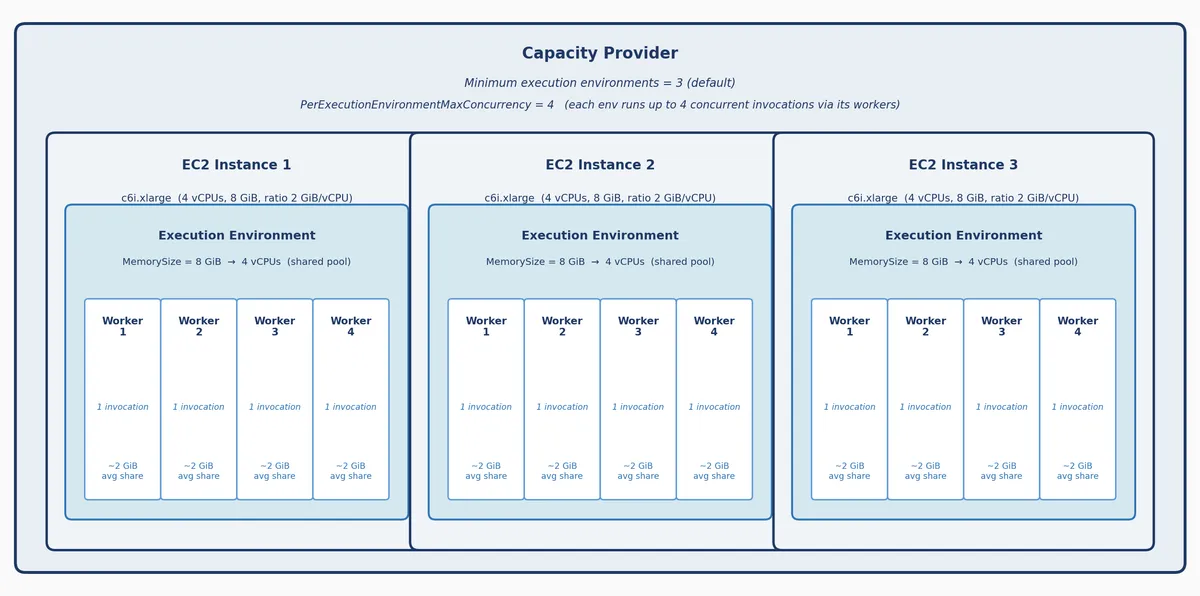
All three layers are configured through a single logical resource called a capacity provider. Think of it as the blueprint that holds the instance family, the memory-to-vCPU ratio, the VPC and subnet selection, and the scaling bounds. When you deploy a Lambda function on this compute type, you attach it to a capacity provider, and AWS uses that configuration to provision the right instances and lay out the execution environments and workers inside them. Multiple functions can share one capacity provider, which pools their compute and their costs.
Multi-Concurrency and Runtime Thread Safety
In contrast to regular Lambda functions, each execution environment can handle multiple requests at a time. You set PerExecutionEnvironmentMaxConcurrency, and Lambda routes that many invocations into the environment's workers, all sharing one memory pool with no strict per-worker quota. If the workers' combined memory use exceeds MemorySize, the environment OOMs and every worker in it dies together.
The sizing rule follows directly: each worker's effective memory share is roughly MemorySize divided by PerExecutionEnvironmentMaxConcurrency, and that number must be at least what one invocation actually needs. For a 1 GiB handler with MemorySize = 8 GiB, PerExecutionEnvironmentMaxConcurrency up to 8 is safe (8 GiB / 8 workers = 1 GiB each). Higher risks OOM when all workers are busy; lower leaves concurrency on the table.
How those workers behave depends on the runtime. In Python, each concurrent invocation runs in its own separate OS process, which keeps invocations isolated by design.
Node.js, Java, and .NET take a different approach and run concurrent invocations as threads inside a single process. That is efficient, but it means your code must be thread-safe: any mutable global state needs mutexes or locks, any write to shared locations like /tmp needs care, and any library you import (logging, HTTP clients, ORMs, SDKs) has to document thread safety.
Lambda Managed Instances Scaling
Unlike default Lambda, which reacts to each incoming invocation, Managed Instances scales asynchronously based on resource-consumption signals like CPU and memory utilization across your capacity provider. New instances come online within tens of seconds and join the capacity provider.
Lambda Managed Instances Observability
The observability story has two sides. The first is that AWS publishes a meaningful set of CloudWatch metrics for Managed Instances at both the capacity-provider and execution-environment level, at 5-minute intervals and 15-month retention. The ones you will reach for most often are ExecutionEnvironmentMemoryUtilization for memory pressure and the granular throttle metrics CPUThrottles, MemoryThrottles, DiskThrottles, and ConcurrencyThrottles, which tell you exactly which resource is the bottleneck when requests get rejected. The AWS Managed Instances monitoring documentation is the reference I recommend using as the starting point for any alarm set you build on this compute type. The second side is that there are no concrete health guidelines in those docs. AWS shows you the metrics but does not tell you what a healthy threshold looks like for your workload, so defining what normal means is on you.
That lands in practice as another layer of monitoring on top of what you already run for default Lambda. Your dashboards and alarms for invocations, errors, throttles, and concurrency still apply, and you now add instance-level and capacity-provider-level alarms alongside them. Expect your monitoring surface area to grow when you adopt this compute type, and budget time to build and tune that second layer before you promote the function to production traffic.
One operational detail worth flagging: Managed Instances metrics are emitted per function version, which means your alarms need to target a specific published version rather than the $LATEST alias, or you will end up alarming on whatever version happens to exist when the metric fires. Publish a new version on every deploy, update the production alias to point at it, and configure alarms against that published version so they reflect the traffic you actually serve. If you leave alarms pointing at $LATEST without publishing a version, the dimensions do not line up and the alarms will look quiet even when something is on fire.
Lambda Managed Instances Pricing
AWS Lambda Managed Instances pricing has three components: $0.20 per million requests, a 15% management fee on top of the on-demand EC2 price for the instances Lambda runs for you, and the standard EC2 instance charges themselves. Duration is not billed separately, which is why this compute type becomes attractive at high utilization. In addition, because the EC2 portion is billed at standard prices, you can apply Compute Savings Plans, and that is where the economics really tilt.
Marcin Sodkiewicz's Lambda cost calculator is the fastest way to run the comparison for your workload, and the AWS Lambda pricing documentation has the full rate card but it’s not trivial.
Other pricing considerations: VPC-by-default adds a networking bill that is easy to miss. Two interface VPC endpoints for CloudWatch Logs and X-Ray run roughly $28-$40/month plus $0.01/GB data processing, and a NAT Gateway sits around $32/month plus transfer but gives you generic egress for other AWS services that do not have gateway endpoints. Only S3 and DynamoDB have free gateway endpoints; everything else is interface-only. Fold that into your total-cost-of-ownership before migrating.
Lambda Managed Instances Limitations
The first limitation is the configuration and cost guesswork. There is no official AWS calculator for either picking the right instance and memory configuration or for estimating whether Managed Instances actually saves you money. Most of my existing default-Lambda functions run at well under 2 GB of memory, which is already below the Managed Instances floor, so my starting intuition for MemorySize was wrong and I had to iterate by hand. AWS shipping a first-party calculator that covered both configuration AND cost comparison would go a long way; until then, we are leaning on community-built tools and spreadsheet math.
The second is the VPC-by-default requirement. If your function currently runs without a VPC, you now need to plan for one. This is not unique to Managed Instances, but it is a change in posture from the default Lambda experience.
The third is the resiliency floor of three execution environments. The Function scaling configuration sets "Minimum execution environments" to 3 by default, and AWS places those environments on instances distributed across whatever Availability Zones your VPC config covers. You pay for that baseline even when traffic is at zero, so there is no scale-to-zero on this compute type. For low-volume functions, the baseline cost can dominate the bill and push the economics back in default Lambda's favor, so this is the single biggest factor in the "should I migrate this specific function" decision.
The fourth is that deployments take longer than default Lambda (plan for roughly three to five minutes), and the capacity provider only starts provisioning environments once you publish a function version.
Deployment Pitfalls: Versions, Init Failures, and vCPU Quotas
My first deploys failed during init because I had set MemorySize too low for the init process. The function never went healthy, the deploy never completed, and the instances that had already launched sat there holding vCPUs. Finding the right MemorySize meant iterating by hand with no signal other than deploy success or failure, which is a slow and awkward feedback loop.
That led into the second surprise. The stuck, failed deployments kept holding capacity, and my next attempts hit a MaxVCpuCount limit error. Worse, my CloudFormation stack ended up in a ROLLBACK_FAILED state, which blocked any further changes until I cleared it manually by calling continue-update-rollback on the stack. The fix was clearing the stuck state, not raising the cap. Size MemorySize with real headroom for init before your first rollout, and keep continue-update-rollback in your runbook for when things stall.
On the cap itself: CapacityProviderScalingConfig.MaxVCpuCount is not mandatory. It is a FinOps or safety guardrail, and you can omit the block entirely, which lets Lambda scale up to your account's Lambda vCPU service quota. The cap matters most once multiple functions share a capacity provider, because they all draw from the same pool and a well-set cap stops one misbehaving function from starving its neighbors. Set it in production; leave it off while exploring with a single function.
A few more timeout and error-handling gotchas specific to the execution environment model live on AWS's error handling documentation. It is a short read worth doing before your first production rollout.
Should You Use AWS Lambda Managed Instances?
Lambda Managed Instances is a unique offering. For high, steady traffic where cold starts hurt and duration charges pile up, the economics can be meaningfully better than default Lambda, especially when you apply existing Compute Savings Plans or Reserved Instances. The hybrid story is the real headline: keep the rest of your service on default Lambda and move only the hot functions, which was not possible before without reaching for Fargate or ECS.
Before migrating anything, run the function's numbers through the calculator linked above with both default Lambda and Managed Instances pricing, folding in the VPC networking cost and the three-environment baseline. If the math does not clearly beat default Lambda, stay where you are. If it does, you have a migration candidate.
In a follow-up post I walk through the full CDK implementation, including capacity provider wiring, IAM roles, VPC setup, and a deployment script. Whichever path you take, AWS's best practices for Lambda Managed Instances is the reference to keep open while you configure the function.