


This blog explains how you can use AWS CDK to deploy to your AWS account using GitHub Actions CI/CD pipeline.
Feel free to use the code snippets as you please.
View the AWS Lambda Handler Cookbook repository and its GitHub Actions workflow file for a fully working GitHub AWS Serverless service template that uses the same snippet.
Update January 2024
This complete CI/CD file has been revised and updated with newer versions and multiple environments: deployments to dev, staging and production accounts:
TL;DR Video
This blog post is available as a video.
Going Over The Job Steps
Let's go over the CI/CD pipeline steps:
- Environment setup
- AWS account setup
- Run linters & unit tests
- Deploy stack
- Run E2E tests
- Destroy stack (for dev stack only)
Environment Setup
Python & Node Setup
This snippet will setup Python 3.9 and Node v16 in the CI/CD runner.
Setup AWS CDK
It's recommended to use latest pip and AWS CDK version.
In line 4, you should install your Python dependencies with either pip, pipenv, or poetry, depending on your weapon of choice to manage Python dependencies.
These dependencies include development dependencies (pytest, linters, etc.) and service runtime dependencies.
Setup AWS Secrets
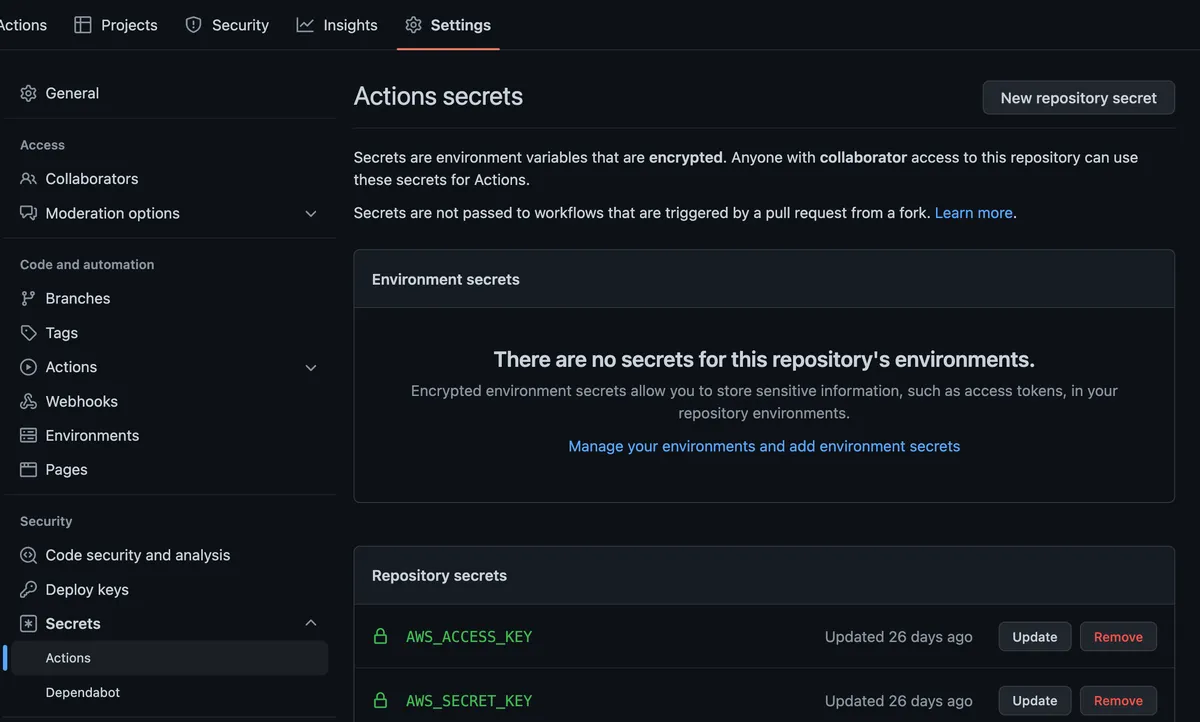
You must set up GitHub's repository secrets for this snippet to work.
Under Settings/Secrets/Actions, add 'AWS_SECRET_KEY' and 'AWS_ACCESS_KEY'.
These secrets are used in a predefined IAM role you created for your CI/CD process.
This is a simple example; however, for security reasons, it is best to use an SSO solution (out of the scope of this guide).
The yaml config:
In line 7, choose your AWS region of choice.
Linters & Unit Tests
Right before deployment, it is recommended to run linters such as:
- pylint/flake8
- pre-commit checks
- yapf/black
- Code complexity checks (radon/xenon)
See the linters example and configuration in my GitHub Actions workflow file and the project Makefile that runs the linters commands.
Once the linters finish, run unit tests as a first service logic gate.
Deploy Time
In line3, you must set the correct path to your CDK 'app.py' file.
I usually put all the CDK project files in a 'cdk' folder instead of the root project path.
E2E Tests
Once deployment is completed, you should run your E2E tests and make sure your service runs properly on AWS. You can use pytest to create REST API requests or other triggers to test your deployed service.
Destroy Stack
This step is relevant only for local stack or pull requests where you want to destroy the stack in the end.
As in the deployment stage, make sure set the correct path to your CDK 'app.py' file.