

I'm a backend developer, and my team and I wanted to understand how our API would perform under heavy traffic. We already had a performance testing framework that worked well for our regular tests, but we wanted to see how things would behave at production scale.
When we increased our test targets to thousands of requests per second (RPS), our test runner couldn't keep up, and the latency measurements became difficult to trust. We needed a way to generate more traffic without relying on a single machine, which eventually led us to Distributed Load Testing on AWS (DLT).
In this post, you will learn why we chose the AWS Distributed Load Testing service, how we integrated it into our testing pipeline, and what we learned from running millions of requests, including some surprising findings about caching, response times, AWS limits, and cost.
The Problem
Where We Started
Before testing at thousands of requests per second, we already had a performance testing framework running on a single continuous integration (CI) agent, the machine responsible for running our automated tests.
We used Pytest to define the API requests and expected responses, then generate and launch a JavaScript script using k6, an open-source load testing tool that simulates traffic and measures API performance. For server-side measurements, we relied on Amazon CloudWatch.
The API we tested was built with Amazon API Gateway, using VTL templates to map requests directly to DynamoDB. There was no Lambda function or application server in the request path. We wanted to understand how this setup would behave under higher traffic, particularly its latency, errors, and throttling.
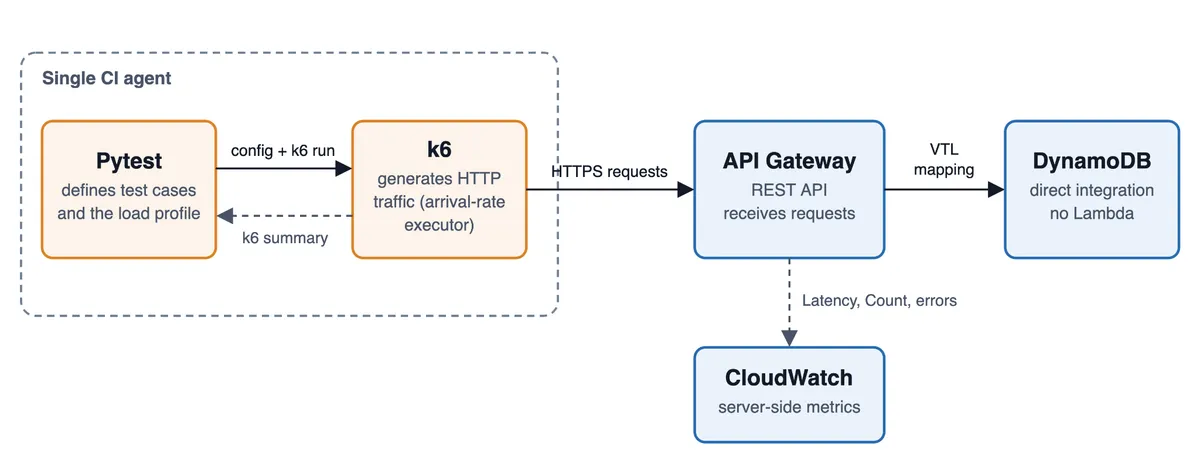
The framework worked well for short benchmarks on pull requests and longer load tests we could run on demand. At around 100 RPS, everything looked healthy, but we wanted to understand how the API would behave at a much higher request rate.
What We Tried and What Didn't Work
Our first approach was to increase the load using the same framework. We configured k6 to ramp up to 1,000 RPS, but the traffic never reached that target. The test averaged 329 RPS across the entire run, including warm-up and ramp-up, while CloudWatch showed that the traffic reaching API Gateway leveled off at around 390 RPS in five-minute averages. k6 also reported 743,403 dropped iterations.
Here's a simplified version of the k6 script our framework generated:
Code Example 1. Simplified k6 configuration showing our 1,000 RPS target and virtual-user settings. Authentication, warm-up, and internal request handling have been omitted.
In k6, a virtual user (VU) is a worker that executes the test script. When no VU is available to start an iteration at its scheduled time, k6 records a dropped iteration, meaning the HTTP request was never sent. These weren't HTTP 429 throttling responses from AWS, as CloudWatch recorded no 4XX errors during the test.
To understand where the problem was, we compared k6's client-side measurements with API Gateway's CloudWatch metrics, including request counts, latency, and errors. The request counts nearly matched: 730,430 in k6 and 730,431 in CloudWatch. API Gateway averaged just 6.6 ms at the traffic rate it received, with only two server errors and no throttling. Meanwhile, k6 measured an average of 103.5 ms, which also included the network path and client-side overhead.
We also tried increasing the number of virtual users, but that didn't solve the problem. We didn't run a controlled comparison with more CPU or a different network setup, so we couldn't determine exactly what was limiting the CI agent.
What we did know was that k6 couldn't generate the traffic we needed, while API Gateway remained responsive under the load it actually received. We still hadn't tested how the API would behave at 1,000 RPS. Our framework worked well for regression testing, but testing at a much larger scale required a different approach.
The Solution
How We Integrated DLT
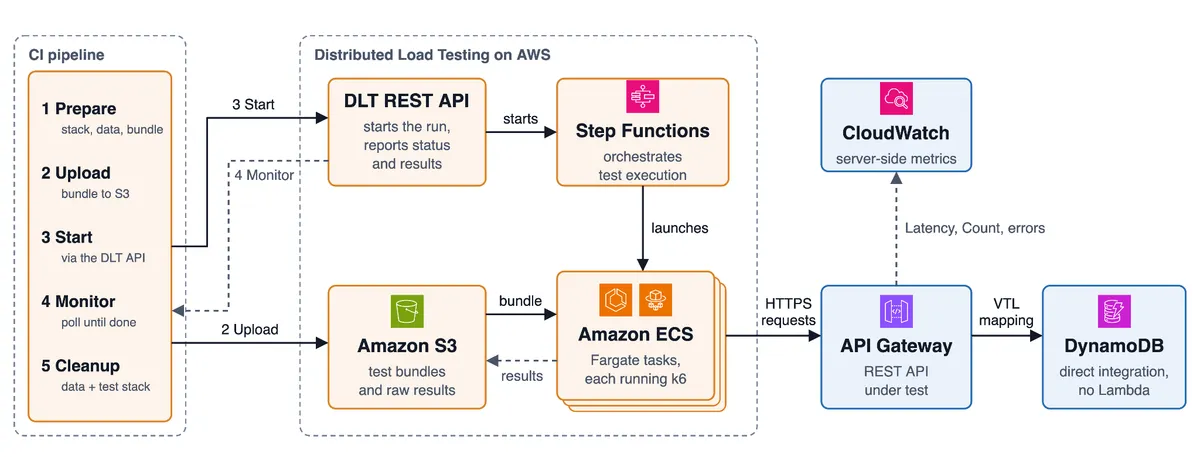
While researching ways to scale our load tests beyond a single CI agent, I came across Distributed Load Testing on AWS (DLT), an AWS solution that runs load-testing tools such as k6 across multiple Amazon ECS Fargate tasks.
With DLT, we could distribute traffic across multiple Amazon ECS Fargate tasks instead of relying on one machine. AWS Step Functions coordinated their execution, while Fargate ran the containers without us having to manage servers. Our initial DLT deployment took roughly 15–20 minutes, based on our notes. In a later test, 20 Fargate tasks went from provisioning to running in about two to three minutes.
We kept our existing Pytest framework to prepare the test cases. Our CI pipeline deployed a test API stack in our AWS account, prepared the test data, and uploaded the k6 files to Amazon S3. It then started the test through DLT's REST API and monitored its progress. After the run, the pipeline deleted the test data and destroyed the test API stack. DLT remained deployed for future tests, although the load-generating Fargate tasks stopped when each run finished.
Challenges We Had to Solve
Controlling the request rate was the first challenge. Our original k6 tests used a ramping-arrival-rate executor, which let us define the target RPS directly. DLT's Standard mode instead lets us configure tasks, virtual users, and test duration, as shown in Figure 3, but it doesn't preserve our original traffic configuration. To reproduce the load profile we wanted, we added pacing logic to our k6 script so each virtual user generated its share of the target traffic.
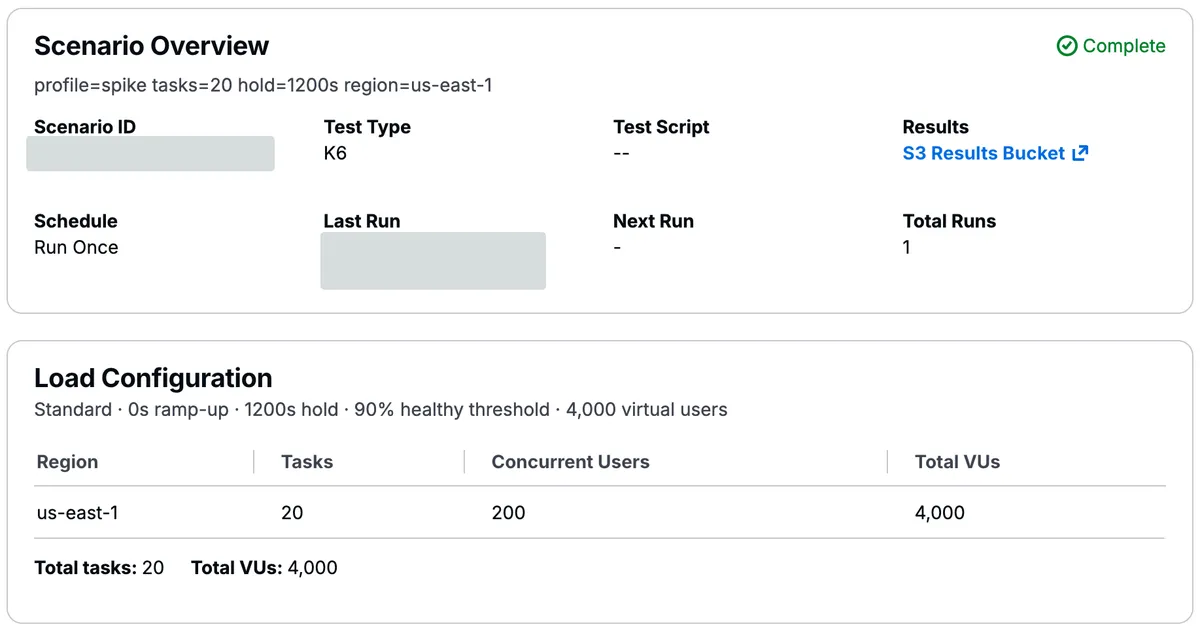
Another challenge was deciding how many load generators we needed. DLT used 2 vCPUs per Fargate task, and we configured 200 virtual users per task. Since the number of virtual users doesn't directly determine the RPS, we first measured how much traffic a single task could handle. During calibration, it began falling behind as we approached 2,500 RPS. Rather than pushing each task to its limit, we distributed our 10,000 RPS target across 20 tasks, giving each one approximately 500 RPS. The test delivered about 99.8% of its planned requests, sending more than four million requests in total.
Insights
Once we could generate traffic at the scale we wanted, we started seeing behavior that our smaller tests had never revealed. Some results were expected, but others made us question assumptions about caching, response times, and the cost of load testing.
When a Smaller Cache Made Things Worse
One of our biggest surprises came from API Gateway caching. We expected caching to improve performance by reducing calls to DynamoDB, but our first high-traffic test showed the opposite.
In a spike test that peaked at about 10,000 RPS, k6 measured a p95 response time of just 12 ms with caching disabled. In a separate run with the smallest API Gateway cache enabled (0.5 GB), p95 jumped to 103 ms.
We repeated the experiment about two weeks later and saw a similar result of 108 ms. API Gateway's own latency metrics confirmed that the slowdown was happening on the server side.
CloudWatch showed the cache misses too. In the worst five-minute period of the repeat run, more than a quarter of requests missed the cache. When we tested a larger 1.6 GB cache, p95 dropped to 13 ms, with only about 0.1% cache misses.
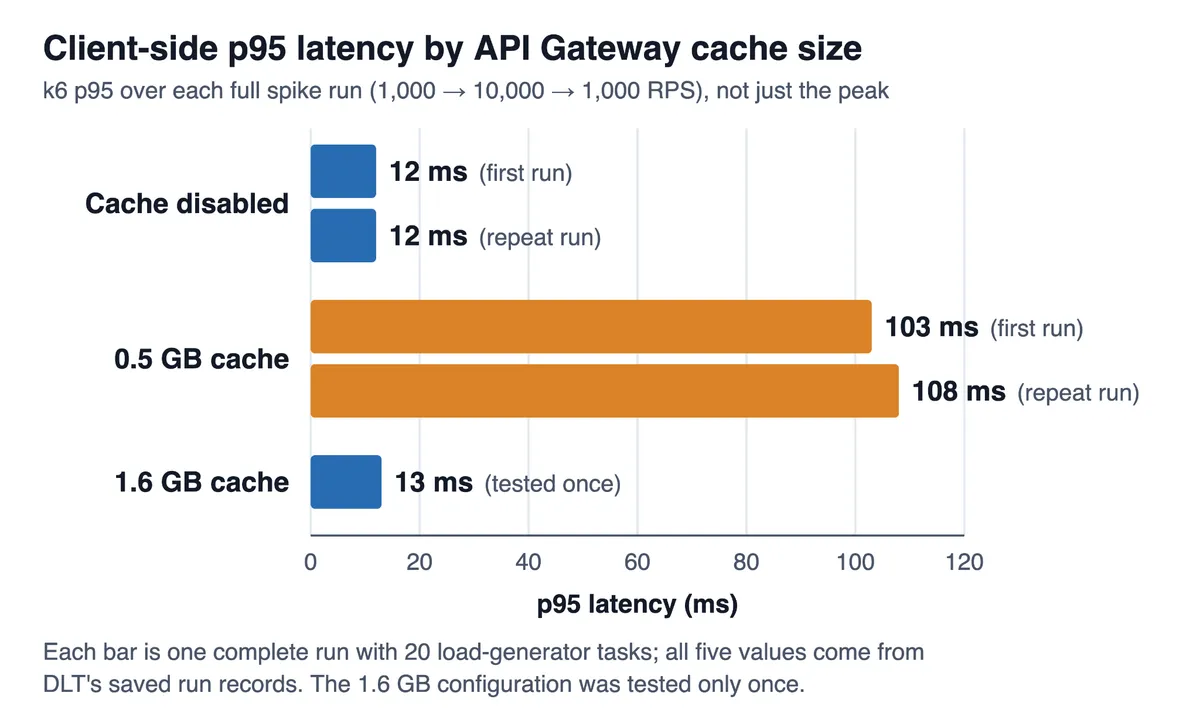
We couldn't confirm exactly why the smaller cache struggled. However, AWS documents that cache capacity affects the CPU, memory, and network bandwidth available to the cache, not just its storage size. That could explain what we observed, but we didn't have the cache-node metrics to verify it.
The lesson was that cache sizing isn't only about fitting your data into memory. You also need to test whether the chosen capacity can handle your expected traffic. Since the larger-cache result came from a single run, we treated it as a finding worth validating further rather than a final configuration decision.
More Load Generators, Better Measurements
During calibration, we compared two tests targeting 3,000 RPS against the same API. With one Fargate task, k6 reported a client-side p95 latency of 83 ms and delivered about 95% of the planned requests. With five tasks, p95 dropped to 14 ms, while 99.7% of the planned requests were delivered.
API Gateway's average latency barely changed, from 5.8 ms to 6.2 ms. The API itself hadn't become faster. Distributing the traffic across more generators appeared to reduce the overhead affecting our client-side measurements, although we couldn't isolate the exact cause.
This reinforced something we had learned from our original CI framework: before concluding that your API is slow, make sure the load generator isn't affecting your measurements.
A Completed Test Isn't Necessarily a Successful Test
We also discovered a gap in how our pipeline evaluated results.
Our CI integration checked whether DLT reported that the test had completed. But a completed execution doesn't necessarily mean the intended traffic was generated or that the API performed well.
To evaluate each run, we manually reviewed the request totals and latency reported by k6 and DLT, then compared them with API Gateway's CloudWatch metrics for the same test window. We checked the request count, 4XX and 5XX errors, and server-side latency to understand how much traffic actually reached the API and how it behaved. This manual review helped us understand whether the test had actually delivered the expected traffic and how the API performed, rather than relying on DLT's completion status alone.
Ideally, DLT would support built-in service-level success criteria. Until then, our next step is to automate these checks in our CI pipeline.
AWS Limits and Unexpected Costs
Finally, testing at scale taught us to pay attention to limits and costs before starting a large experiment.
We generated close to 10,000 RPS, which was also the regional API Gateway account-level quota available to us. We didn't increase that quota, so our results couldn't tell us how the API would behave beyond that traffic rate.
Based on our billing data and estimated Fargate costs, a spike of approximately 4.3 million requests cost around $16. Most of that came from API Gateway requests, while the Fargate load generators themselves cost less than a dollar at standard rates. The cost was manageable, but estimating it in advance is still important. AWS Pricing Calculator is a useful starting point before running tests that generate millions of requests.
We also found a less obvious recurring expense. DLT retained a CloudWatch dashboard for each test scenario, and after eleven scenarios, those dashboards represented approximately $33 per month in our account.
Generating enough traffic was only part of the challenge. We also needed reliable measurements, an understanding of AWS quotas, and a way to account for the resources and costs left behind after each test.
Summary
Moving from a single CI agent to AWS Distributed Load Testing allowed us to generate traffic that our original setup couldn't sustain. But reaching our target RPS was only part of the challenge. We learned that reliable load testing also means trusting the load generators, checking how the API behaves under realistic traffic, and looking beyond a test's completion status.
Looking back, there's also an opportunity to make this work reusable. Today, our integration is built around one service. We used CDK for the temporary test environment, while DLT itself was deployed using AWS's CloudFormation template. A natural next step would be to move the common k6 and DLT integration logic into a shared CDK construct and make the deployment and test workflow easier for other teams to adopt.
The biggest lesson for me was that load testing isn't just about generating more requests. It's about understanding what you're measuring, learning from unexpected results, and building a process you can trust the next time you need to test at scale.