

Software testing increases application quality and reliability. It allows developers to find and fix software bugs, mitigate security issues, and simulate real user use cases.
It is an essential part of any application development.
Serverless is an amazing technology, almost magic-like. Serverless applications, like any other applications, require testing. However, testing Serverless applications differs from traditional testing and introduces new challenges.
In this blog post, you will learn why Serverless services introduce new testing challenges and my practical guidelines for testing Serverless services and AWS Lambda functions that mitigate these challenges.
Part twowill teach you how to write tests for your Serverless service. We will focus on Lambda functions and provide tips & tricks and code examples by writing tests for a real Serverless application.
In part three, you will learn to test asynchronous event driven flows that may or may not contain Lambda functions, and other non-Lambda-based Serverless services.
A complimentary Serverless service project that utilizes Serverless testing best practices can be found in the AWS Lambda handler cookbook repository.
Is Serverless Testing Any Different?
Well, yes, and by quite a lot.
In the ole' days, developers would run the code locally, and it would simulate the application behavior quite well. In most, cases, it was easy to run the code in the IDE, add breakpoints, and debug and If it worked locally, you had a lot of confidence that it would run just fine once deployed to production.
In Serverless applications, it's not that simple anymore.
Lambda Functions Perspective
Let's take a look at Lambda functions and the testing challenges they present.
AWS Lambda functions run on AWS infrastructure in an ephemeral container environment and require numerous function configurations.
These characteristics introduce numerous challenges that require a deeper understanding of the Lambda service:
- Different event triggers - a Lambda function can be triggered by three types of event triggers (synchronous, asynchronous, poll based) and integrates with many AWS services. Each event has a different schema and data types for the metadata envelope, and the business domain input payload. More about it in my Lambda input validation post.
- Stateless - Lambda functions run on ephemeral containers.
- Environment variables - local IDE environment variables are different than configured Lambda functions. This discrepancy can cause bugs at runtime and even crashes.
- Role - Lambdas are run with a different role than your developer IAM user permissions. This discrepancy leads to code running ok locally and failing in the cloud due to role's permissions misconfigurations.
- Memory configurations - Lambda function runs with a preconfigured RAM different from the developer machine. In addition, the more RAM you configure, the better the CPU performance AWS provides the function.
- Lambdas behind API gateways are often protected by an Amazon WAF and authorizers such as IAM authorizer, Cognito authorizer, and custom authorizer. These functionalities are either hard or impossible to simulate locally.
- Timeouts - Lambda functions have a default value of 3 seconds timeout, but you can set it to up to 15 minutes. As your application changes, your total function runtime might increase, too, and you might need to adjust the timeout value.
- External dependencies - Lambda functions are usually packaged as a ZIP file and uploaded to AWS. If one package is missing, the function will fail during invocation immediately due to import errors. Lambda layers are an option to package external dependancies. However, they can complicate the use case even further when not used properly. Read the Lambda layers best practices post.
- Lambda architecture types (X86 or ARM64) affects performance and cost and is, in many cases, different than the development machine's CPU architecture type. This discrepancy can cause issues when building external dependencies for the Lambda function's ZIP file or layer.
- Cold starts/provisioned concurrency/reserved concurrency - are advanced topics that affect application performance, cannot be simulated locally, and are hard to simulate at scale on AWS.
The bottom line is that application code that works locally on your IDE is not guaranteed to even run in the AWS environment, let alone work correctly and as expected.
Serverless is More than Just Lambda Functions
Allen Helton, AWS Serverless Hero, defined Serverless quite nicely in his blog post:
"When I say serverless, I am generally referring to the services that developers use to build applications. Examples are AWS Lambda, EventBridge, DynamoDB, and Step Functions" - Allen Helton
Allen is right. You are getting top-class, state-of-the-art black box services that you piece into your architecture puzzle. The way I see it, Serverless is a synonym for event-driven architecture built on top of AWS-managed services and usually your goal is to pass an event through a chain of services until it reaches its final destination and form.
As such, Serverless architecture introduces new testing challenges:
- You can't test every piece of the puzzle by itself, especially the AWS-managed parts (SQS, SNS, Step functions, DynamoDB, etc.) and you probably don't need to. You can test smaller parts of the puzzle, i.e., the Lambda functions that you write, and you can test the entire puzzle from the starting event, up to the finish point.
- Security configuration - you need to understand how to properly configure the AWS Serverless services and maintain security best practices (encryption at rest & transit etc.).
- Infrastructure & resilience configuration - developers may alter resources and their configuration; how do we know they configured them correctly? How do we know the resources even exist after the change?
- Scaling & resource quotas - Serverless services have built-in scaling properties. However, we need to configure their boundaries in many cases to reduce costs during heavy load periods and prevent AWS resource quota limits. For example, every AWS account and region has a maximum amount of concurrent lambdas, which are shared across ALL lambda functions. If two lambda functions are deployed in the same account and region, one function can scale drastically and cause starvation and throttling to the other function (HTTP 429 error) since the entire account reaches the maximum concurrent quota.
- Intrinsic functions black box - what if you use EventBridge pipes, or Step Functions with intrinsic functions? You cannot simulate them locally. How can you be sure that you configured them correctly and that they will work as expected?
However, despite all these challenges, there's light at the end of the tunnel.
Everything has a solution, so don't worry and read on.
Developer Experience and Quality Assurance Goals

The main goal is to test as much as possible to increase confidence in the quality of the application; however, a secondary goal is for the developer to have the best development experience in the Serverless domain.
The better the experience, the faster the development is.
So, as a Serverless application developer, I'd like to:
- I want to test my code locally in my IDE of choice and to be able to add breakpoints. I want to gain as much certainty as possible that my Lambda function, which runs locally perfectly, will also run perfectly on my AWS account.
- I want to define my infrastructure as code (IaC) along with my application code and test them together.
- I want to be independent during my development and not interfere with other developers' work who are also working on the same application.
- I want to automate all my tests and remove the need for manual testing.
AWS Serverless & Lambda Testing Guidelines
Serverless Application Project Structure
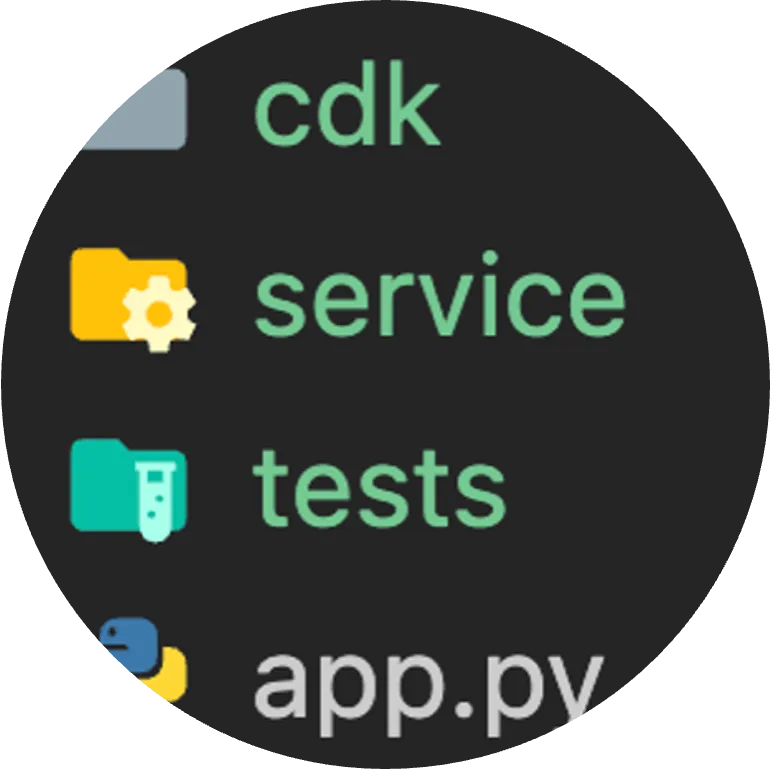
Each application repository will contain three folders: service code, infrastructure as code folder (AWS CDK in this example), and tests folder. I believe that a Serverless developer must "own" the infrastructure and be able to define it and understand its architecture.
app.py is the entry point of the CDK application that deploys the infrastructure code and uploads the service folder with the Lambda functions.
Lambda Functions' Local Environment
We want to simulate the Lambda functions local environment and external dependencies in the IDE. In Python, which is my languagrs of choice for Lamda functions, we will install all dependencies to a local virtual environment.
As for dependency manager, you may choose between poetry and pipenv. I prefer poetry as its faster, so all the functions' dependencies will reside together in a single .toml file.
All Lambda functions in the project use identical library versions defined in the toml file. When building Lambda functions with external dependencies or lambda layers, build them according to the .toml file. Read more about it in my building Lambda layers with CDK post.
Developer Deployment Independence
We want our developers to be able to work against real AWS accounts and resources without disrupting the work of their coworkers.
There are two possible solutions that I'm aware of:
- AWS account per developer
- Single account for all developers
In the first option, each developer deploys its application to its account. Each developer has a sandbox to play with, reducing the chance of reaching resource quota limits. However, multiple accounts increase account management overhead.
The second option is to have one 'dev' AWS account shared among all developers, but each developer deploys its application stack (CloudFormation stack) with a username prefix, thus removing a chance of conflicts and enabling the developers' complete freedom. In this option, there's more chance for reaching AWS resource quotas (in many cases, these are "soft" limits that you can increment for additional cost), but it's easier to manage from a company perspective.
Choose whatever option makes more sense to you.
Debug in IDE & Generated Event Inputs
I believe that debugging in the AWS console should always be the last resort.
It takes more time as you don't have breakpoints, so you resort to debugging with log printing, which translates to a bad experience overall.
A better developer experience would be to write a test that calls my Lambda function handler in my IDE, sends it a predefined event (that matches the schema of the Lambda integration), and verifies its side effects and response.
All locally run, simple and fast.
We will keep it simple; we will not use Lambda simulators nor SAM's local debug approach, or spin up local docker images, just plain old IDE tests ('pytest' in Python) with generated events and local breakpoints.
However, this begs the question, how do you generate these events? I'll leave that to part two that will cover this in detail. However, if you wish a spoiler, see the integration test example on GitHub.
Don't Mock AWS Services Unless You Have To
The Pythonic motto library mocks AWS services, removing the need to deploy your application or pay for API calls against AWS services. Other programming languages have their motto implementation.
However, they all share one thing in common - they sound great on paper, but in my experience, you should only use them if you have to.
Let me explain why: one downside of using 'motto' is that when you use it to mock one AWS service, it forces you to mock all of them. You can't use ANY other real AWS services API calls. Another downside is that I've stumbled upon is instances where the motto response was different from the real deal. And yes, 'motto' can have bugs too.
So, you should use 'motto' in the following use case:
- It isn't easy to simulate a specific use case, or you need to know what the response would look like. For example, you want to use AWS organizations API to list all the accounts in the organization, and you want the organization to have 50 accounts in 3 hierarchies. Unless you keep this real AWS organization ready for use, a 'motto' mock is the only way to simulate this use case.
Debug in IDE & AWS API
Call real AWS services' API in IDE - continuing the last point, when using AWS SDK ('boto' for Python) in the Lambda, we will not mock it. I want to gain as much certainty and use actual AWS services as possible during my local debug sessions and tests.
Of course, this method means increased overall cost and is considered the major con of this method (and of the developer deployment independence) as your entire development team will deploy the infrastructure and use AWS API calls to interact with it.
Serverless has many pricing benefits (you pay is most cases only for actual runtime in millisecond for Lambdas), and AWS has a free tier, but eventually, it may add up.
In addition, many resources cost you money to deploy; KMS CMK, VPCs, and certificates come to mind.
However, in the grand scheme of things, using real APIs locally with a breakpoint and with ease increases team confidence in its work creates fewer conflicts and discrepancies between local code and code that runs on AWS accounts, and speeds up development. The minimal cost should make it worthwhile if you use pure Serverless AWS services.
Simulate API Failures
Patch AWS calls when you want to simulate exceptions and errors to test edge cases in your code and to increase line code coverage.
A fully working Serverless service template that embodies these guidelines can be found in the AWS Lambda handler cookbook repository, and its project documentation.
Part two will focus on this area with code samples.
Trigger an Event on Your AWS Account
In addition to debugging in local IDE, it's critical to also trigger the deployed application on AWS and verify that it works from beginning to start.
Use actual customer use cases and trigger the beginning of the event-driven architecture, whether it's a REST API call, an SNS message, or any other event.
The Lambda functions and Serverless resources you deployed will all work together from beginning to start on your AWS account.
These tests are the ultimate tests as they simulate real customer use cases and inputs on your AWS accounts.
Automate Everything
Write tests for all customer use cases and edge cases. Leave no stone unturned. Don't manually test your service. You want to gain confidence in your tests and empower your developer to have more responsibility, improved development speed, and confidence in their work. When you have good coverage, you are not afraid to push to production multiple times per day.
To Be Continued - Writing Tests for a Sample Serverless Application
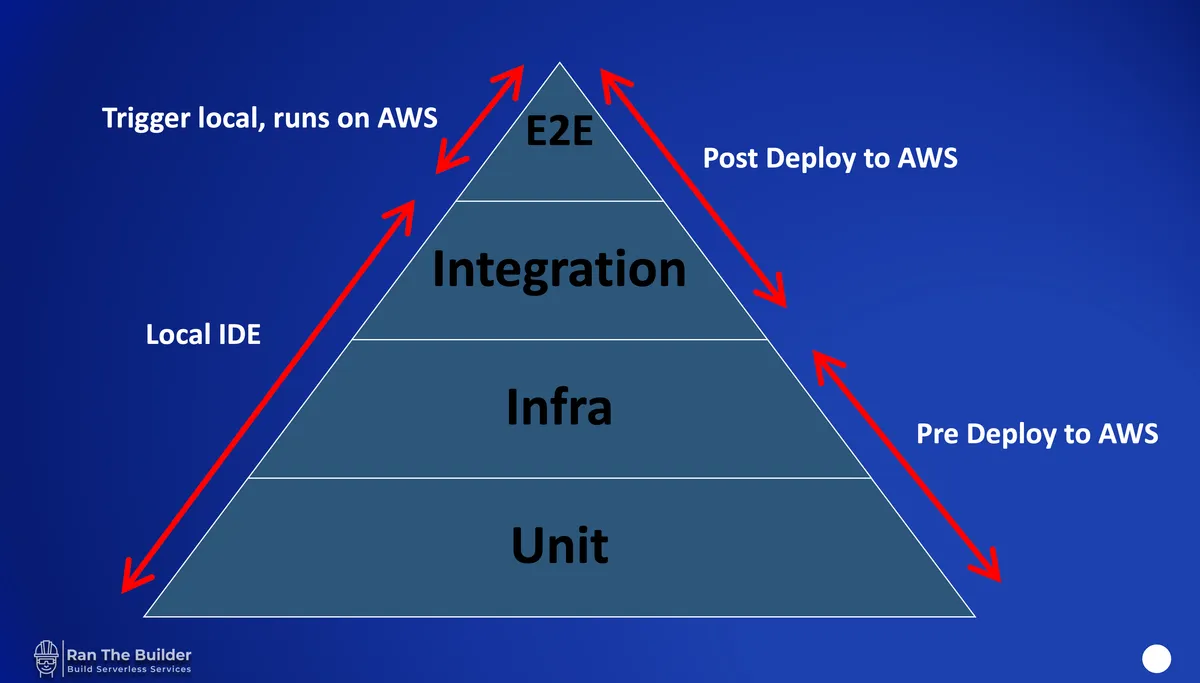
Now that we have the basic guidelines, we will put them to use in the upcoming part two of the series, where I present the Serverless testing pyramid along with code examples and many tips & tricks.