
Someone told me my article “has em dashes, so it’s clearly AI.” They didn’t mention the content itself. Not a single word about it. The article was based on years of hands-on experience, personal lessons, and real production stories, but none of that mattered because a punctuation mark was enough to disqualify the whole thing.
Most AI-generated content does sound generic, and that’s a fair criticism. But the problem isn’t that people use AI to write. It’s that they don’t configure it to sound like them. With the right setup, AI can write in your voice, with your tone, following your rules, and not read like a lifeless robot. You stay in control of the ideas and the message while the AI handles the parts that slow you down.
In this post you will learn how to set up AI writing tools that match your voice, not a generic one. I’ll share the exact configuration, style rules, and custom skills I use with Claude Cowork to write blog posts and LinkedIn content, all available as GitHub gists you can copy and adapt.
Why AI-Assisted Writing Doesn’t Diminish Your Expertise
AI is a tool. Your experience and knowledge are what make content valuable, not whether you typed every word yourself. No one questions a developer for using an IDE with autocomplete, and no one should question a writer for using AI to get their ideas out faster. But some people will dismiss anything that smells like AI regardless of the substance. An em dash here, a clean paragraph structure there, and suddenly your years of experience don’t count.
You can’t change their minds, but you can make AI output indistinguishable from your natural writing. I wrote about this same tension in my post on AI-driven SDLC, where the conclusion was the same: AI accelerates the work, but the judgment still has to come from you.
The setup I’m about to share configures AI to follow your style so closely that the haters have nothing to latch onto, and you get to focus on sharing what you know instead of arguing about how you wrote it.
How To Set Up Claude Cowork For AI-Assisted Writing
I use Claude Cowork with Opus 4.6 as my writing assistant. If you’ve read my Claude Code best practices post, you know I’m already using Claude heavily for coding. Cowork is the same idea applied to writing: you set up projects with specific instructions, reference files, and custom skills that run every time you ask it to write something.
I started with the folder structure and project (called the “writing”) setup from Ruben’s guide on Claude Cowork, which gave me a solid foundation for organizing instructions, reference files, and outputs. From there, I added my own tone and writing style rules, built the anti-AI style guide, and created a custom LinkedIn post drafter skill. The base structure handles the workflow, and everything I layered on top handles the voice. The whole setup takes less than ten minutes to get running, and you can start producing usable drafts immediately.
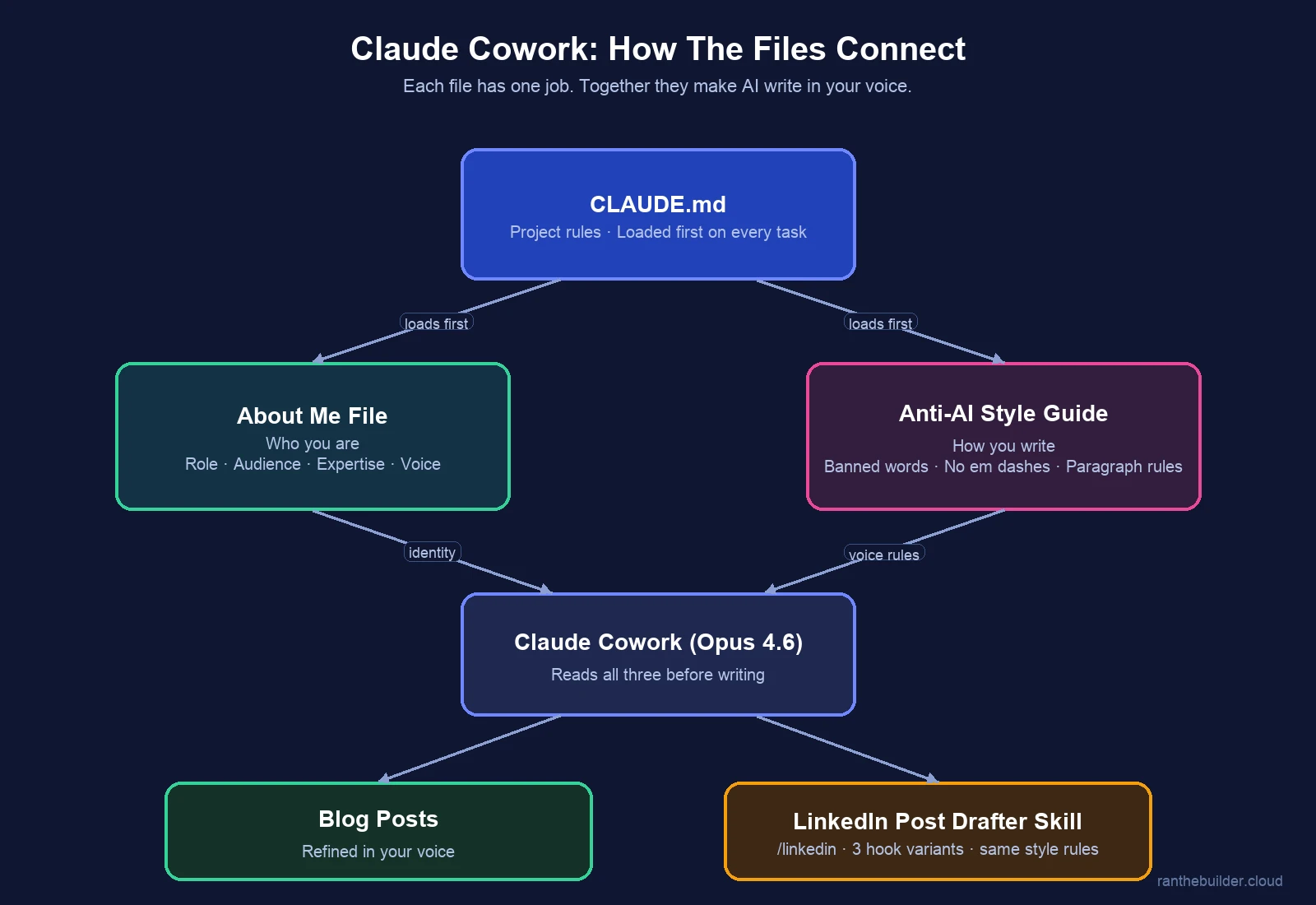
My setup has four pieces that work together, and I’ve shared all of them as GitHub gists so you can fork and adapt for your own voice.
AI Identity File: Teaching The Model Who You Are
The first thing the AI reads before any task is my About Me file.
If you want AI to write like you, it needs to know who you are: your professional context, what you’re known for, and who your audience is. Without this, the AI defaults to a generic “tech professional” voice that could belong to anyone. I found the same principle applies in agentic AI prompting: the more context you give the model about who’s asking and why, the better the output gets.
Anti-AI Writing Style Guide: Making AI Sound Human
This is where the voice stays mine. Instead of telling the AI what to write, I tell it how to write and what not to do.
AI writing fails in predictable ways: em dashes for every aside, choppy fragmented sentences, the same overused phrases, and bullet points everywhere. The style guide is a list of these failure modes with instructions to avoid them. A banned word list kills every cliché AI loves: “deep dive,” “leverage,” “seamless,” “cutting-edge,” and the rest. Formatting rules force paragraphs over bullet points, because real writing connects ideas rather than fragmenting them.
The guide also includes a pre-writing process: before the AI writes a single paragraph, it proposes a title, abstract, and table of contents for my approval. I control the structure and message before any writing gets generated. It’s the same “plan before you build” approach I describe in my Claude Code best practices post.
How To Configure CLAUDE.md For Consistent AI Writing
The CLAUDE.md file is the system-level instruction set for the whole project.
It forces every task to start by reading the About Me and style files, so my voice stays consistent across sessions. It defines read-only folders for source material and a single write folder for outputs, preventing accidental modifications. And the most important operating rule: “if the brief is unclear, ask clarifying questions instead of filling gaps with generic filler.” This single rule improved my output quality more than anything else. It’s the same principle from my agentic AI prompting post: the quality of AI output is proportional to the quality of the input.
Custom LinkedIn Post Drafter Skill For Claude Cowork
The LinkedIn post drafter is a custom Cowork skill that runs every time I ask for a LinkedIn post. It produces three hook variants: bold, personal, and funny, because the hook is what shows before the “see more” fold, and having three angles means I’m not stuck with the AI’s first instinct.
It defines two post structures: connected paragraphs for opinions and blog shares, and emoji bullet lists for release announcements where readers want to scan what’s new. I use the second format frequently when I announce updates to my open-source projects. The same anti-AI style rules are embedded, so LinkedIn posts go through the same voice filter. The tone calibration says to sound like “a smart colleague sharing something over coffee,” not a thought leader dropping wisdom.
These Gists Aren’t Magic
I want to be clear about something: I’m not a prompt engineering expert or a skills specialist. I built the LinkedIn post drafter using Anthropic’s skill builder, and the first version was rough. It’s been through dozens of iterations since then, and it keeps evolving as I learn what works and what doesn’t.
Every time a post lands well, I add it as an example to the skill. Every time the AI sounds off, I add a rule to prevent it. These gists aren’t finished products you can drop in and forget about. Fork them, swap in your own identity, your own banned words, your own blog structure, and keep refining based on what works for your writing. The more you iterate, the closer the output gets to sounding like you.
If these tools help you share real knowledge faster, use them. Move fast and keep the human touch. The world needs more people sharing what they know, not fewer.
And yes, this post was written with AI, guided by my tone, my thoughts, and the message I wanted to get across 😊