


For several days, I thought I had gone viral on a whole new level. My daily blog reads jumped from around 600 to nearly 2,800, with a single post carrying almost the entire spike. Then the skepticism crept in: my daily reports could not tell me where the new readers were coming from, and a jump that large with nothing to explain it felt less like a win than a question. It pulled me into an investigation across AWS WAF, the CloudFront console, and a long back and forth with Claude.
In this post you will learn how I spotted the AI bots crawling my site, why they burn your CloudFront quota and pollute your analytics, and how I fought back with AWS WAF, from challenges and blocking to charging bots for access.
When "Viral" Traffic Is Really AI Bots Crawling Your Site
The post absorbing nearly all of that attention was my write-up on Claude Code best practices, at roughly 14K views. The irony is not lost on me: the machines' favorite reading on my site is my guide on how to use the machines.
However, missing a viral moment I never had only bruises my ego. The traffic itself costs me in three ways at once.

The first cost turns up on a bill. My site runs on one of Amazon CloudFront's flat rate plans, chosen deliberately for cost control: on pay as you go, WAF rules, log ingestion, and CloudFront Functions all meter separately, while the flat plan folds everything into one fixed price with a usage allowance and no overage charges. That buys me a relaxed mind, since no traffic spike or attack can surprise me on my bill. The catch is that every bot request that gets through counts against the allowance like a human visit, so the crawlers burn the quota I bought for real readers. I am, quite literally, paying Amazon to serve the machines that scrape me.
The second cost is corrupted analytics. When thousands of automated sessions pour in with no referrer and impossible browsers, my traffic looks healthier than it is, my most popular post is popular with software rather than people, and every decision built on that data starts from a false premise.
The third cost is the one I find personally annoying. Most of these crawlers are not indexing my posts to send readers back. They are collecting my writing to train models or answer someone else's question inside a chatbot, years of hard won experience taken without a link, a credit, or a cent.
To be fair, this is not all theft. Crawling public content is how the web has always worked, verified search bots still send me visitors, and many would argue anything public is fair game. What I object to is the combination in front of me: bots in disguise, masking who they are so they stay unverified, running on infrastructure I pay for, and leaving me no say in any of it.
Believing this was bots and proving it are two different things, so I went looking for hard evidence.
How I Detected AI Bot Traffic with GA4, AWS WAF, and Claude
Back in Google Analytics, the story fell apart almost immediately. My most loyal reader, going by the numbers, appeared to be a BlackBerry running in 2026. The readers were bots, and once I knew to look the signs were everywhere: 91% of sessions arrived with no referrer, the traffic vanished for the same multi hour window every day like it was clocking out for a shift, and the browser breakdown was full of BlackBerry, Nokia Browser, and Internet Explorer. The engagement time sealed it, because a tenth of a minute on posts that my scroll tracking says take four to ten minutes to actually read is not how people behave, but it is exactly how scheduled jobs behave.
I did not go viral. I got crawled by something that refuses to introduce itself.
To confirm it, I used Claude to pull the WAF statistics and line them up against the exact days GA4 started spiking, which is how I knew both sources were describing the same event.
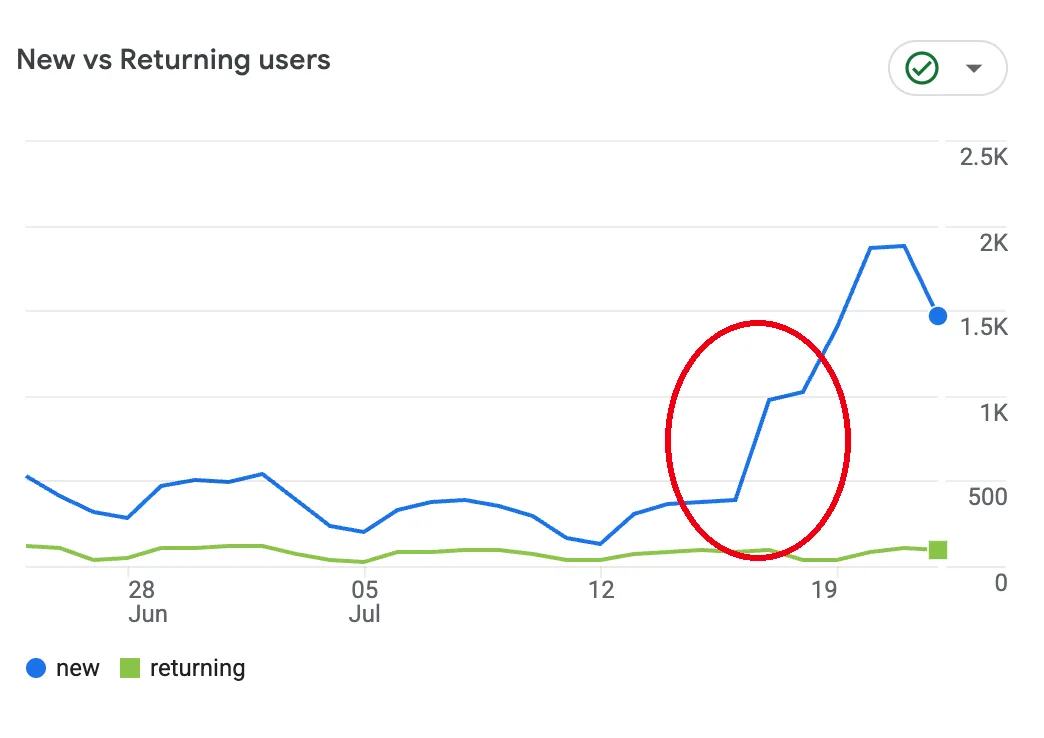
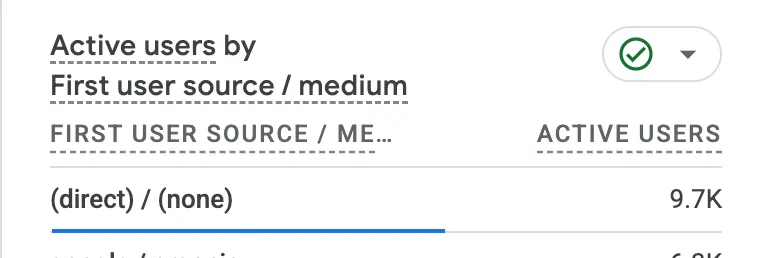
Read together, the two charts told one story. The spike was new users only, fresh devices and addresses I had never seen, not my audience coming back for more, and they arrived as direct traffic, meaning nobody searched Google and clicked, they already had the link and opened it just to fetch the page. Stack that on the tenth of a minute reading time and the fact that the surge concentrated on a single article, even as many other posts got suspiciously better reads too, and the red flag was giant. What I still could not tell was who these clients actually were, so I went to the source, the AWS console.
What the AWS WAF AI Activity Dashboard Revealed
AWS WAF now ships an AI activity dashboard, in the CloudFront console under your distribution's security section, reporting bot and agent traffic server side. I did not have to set anything up for this, it was simply there waiting for me, which is the case for anyone who already has WAF enabled. Across the window I looked at: 103.47K bot requests, 59.65K of them AI bots, a split that changed how I think about who my site is for. However, not all AI bots want the same thing.

AWS splits AI bots into three main types:
- AI scrapers, which systematically collect data from your application to train AI models.
- AI tools, which surface data from your application inside AI applications using function calling.
- AI agents, which autonomously navigate and interact with your application to perform complex tasks.
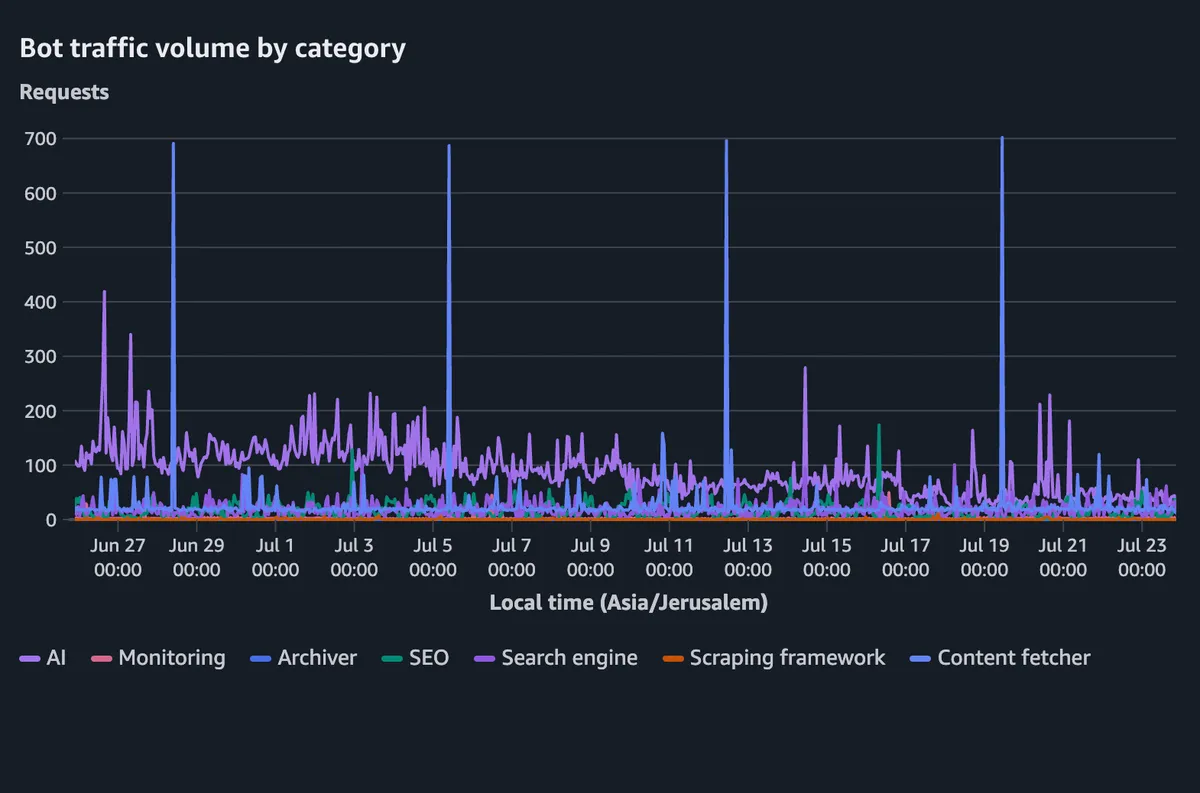
The distinction matters because these are not equally welcome. A tool or an agent fetching a page to answer someone's question at least puts my writing in front of a person, and might cite me. A scraper harvesting the archive to train a model gives nothing back at all. However, the chart also exposed a rhythm I had never noticed, because those towering spikes, four of them reaching about 700 requests, are not random bursts of interest. They are an archiver working through my entire site on a weekly schedule, the same sweep every seven days, quietly taking a full copy of everything I have written.
Verified vs Unverified AI Bots: Who Is Really Crawling?
A verified bot has proven who it is, through a cryptographic Web Bot Auth signature or a documented address range. An unverified bot is one WAF knows is automated from behavior and fingerprinting but cannot name. On my site, only 30.9% of AI traffic was verified and 69.1% was anonymous, which is the number that made the rest of this post necessary.
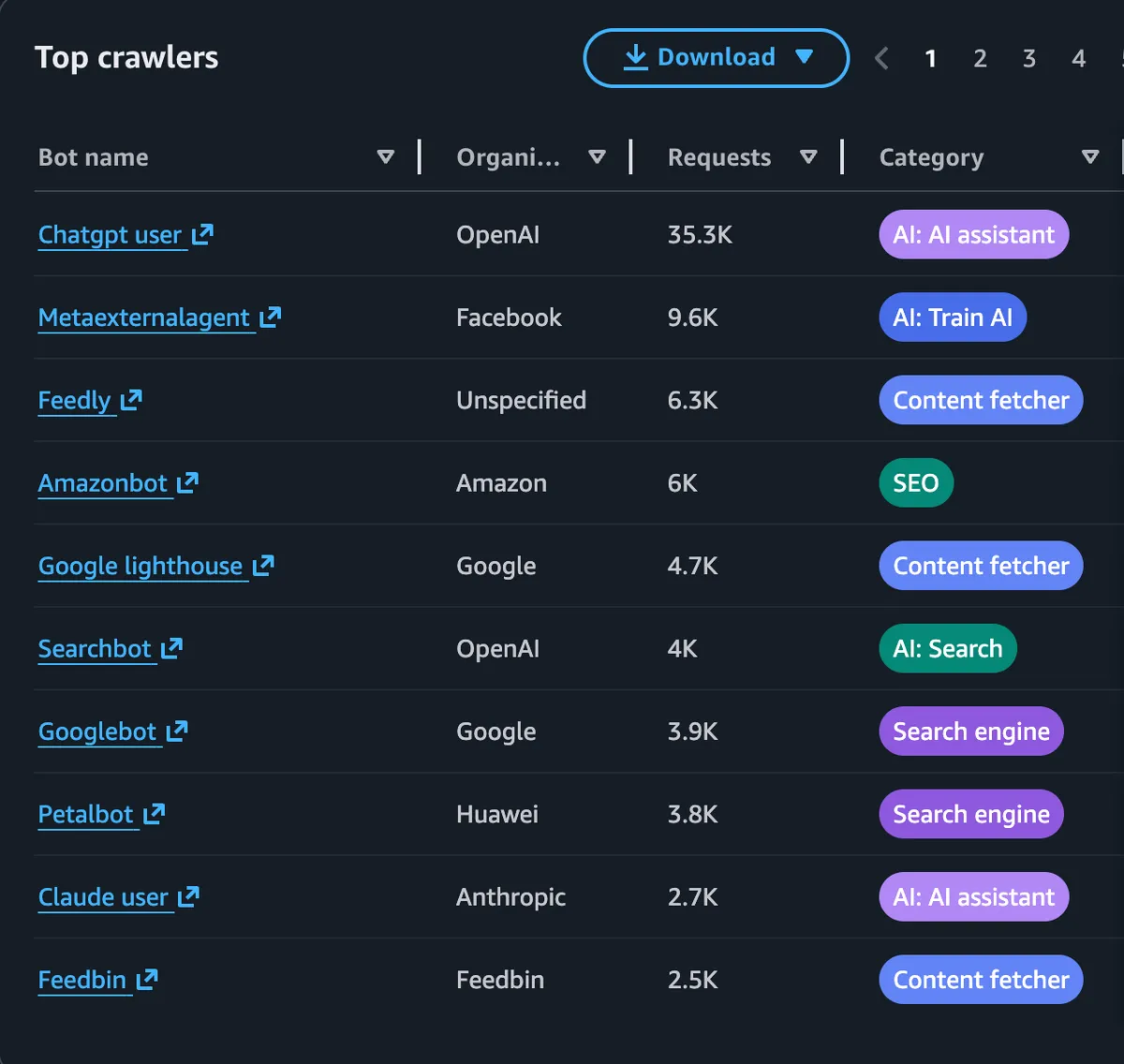
Identity, in other words, turned out to be a matter of choice. Some bots name themselves in the user agent, some wear an old fake browser string like the BlackBerry crowd, and some drive a real browser through automation and hide entirely. Plenty were happy to introduce themselves, led by OpenAI's ChatGPT agent at around 35.3K requests, then Meta, Amazon, Google, and Anthropic's Claude, with content fetchers like Feedly behind them. The anonymous majority is the harder problem, machines I can suspect are machines but cannot verify, which means acting on them risks a false positive. That unattributed slice is the unsettling part, matching no known company or tool, arriving behind ordinary human user agents and ordinary browsers, tripping the behavioral detection, tracking my spike almost exactly, and refusing to say who it was.
One last tell hid in the error metrics: requests probing for URLs that do not exist on my site pushed my 4xx error rate into spikes near 30% that had nothing to do with my code. Bots guessing at paths generate exactly this noise.
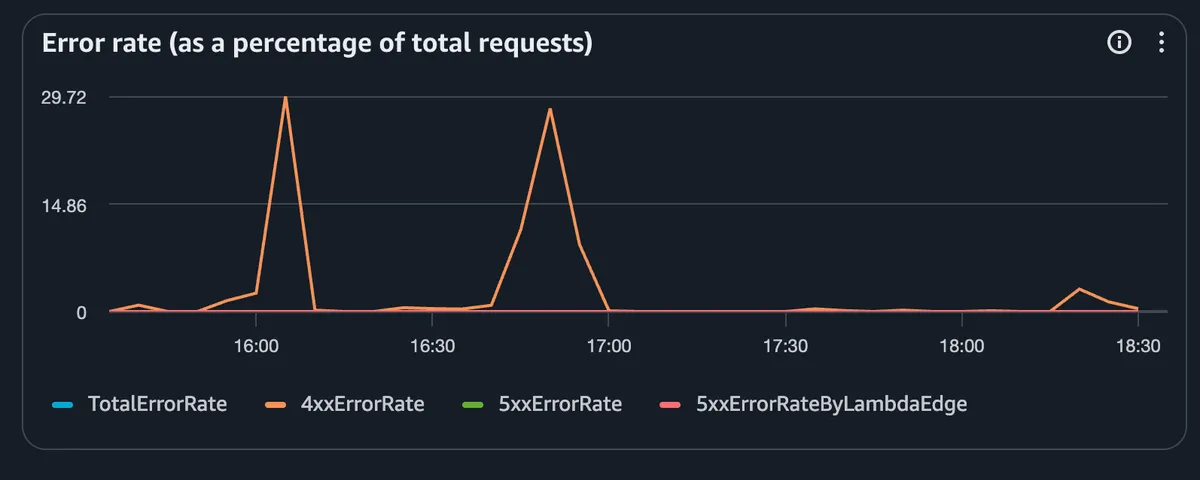
Here is what the dashboard made obvious. Every one of those named crawlers, ChatGPT and Google and the rest, was already visiting long before my spike, at roughly the same rate throughout, so none of them explained the jump. I had simply never bothered to look, assuming in a vague way that bots visit my site and that this was fine. Seeing it laid out was a real eye opener.
What did explain the spike was the unverified traffic, which climbed sharply while everything identifiable stayed flat. Those are the bots presenting human like user agents and driving real browsers, which means I cannot reliably trace them or block them without risking real readers along the way. So what can actually be done about our AI bots?
How I Fought Back Against AI Bots with AWS WAF
Does robots.txt Still Matter in 2026?
One of the common solutions I remember hearing about was serving a robots.txt on your website. But, truth be told, robots.txt serves as a polite signal, not as a defense. AWS's own guidance on managing AI bots with AWS WAF recommends exactly that sequence, robots.txt first, then WAF, but the article has not aged well: the console it describes looks nothing like what I see today, the steps no longer map to the screens, and AWS needs to refresh it, because a site owner following the official path today ends up guessing.
As enforcement, robots.txt is dead. It is purely voluntary. TollBit’s Q4 2024 report found OpenAI's ChatGPT-User agent ignored robots.txt disallow rules 42% of the time, and in December 2025 a federal judge in Ziff Davis v. OpenAI ruled that robots.txt does not qualify as an effective access control mechanism under the DMCA, writing that it controls access to your content no more than a keep off the grass sign controls access to a lawn.
The major problem, though, is not only that an agent can choose to ignore it. Every rule you write in robots.txt targets a user agent string, which assumes the bot identifies itself correctly in the first place, and the bots I most wanted to stop are precisely the ones that do not. So while I did update my robots.txt, I knew I had to dig deeper.
Charging AI Bots with HTTP 402 and the x402 Protocol
The option I find most appealing is to stop fighting and have agents start paying.
AWS WAF's AI traffic monetization answers a request for a protected page with HTTP 402 Payment Required, carrying a machine readable price in USDC over the open x402 protocol, so the agent pays, WAF verifies the payment at the edge, and the page is served in a single round trip. It only works on the bots polite enough to introduce themselves, and it will not stop a single spike, but at least I would be getting something back from the well behaved ones instead of quietly subsidising them.
Why the AWS WAF JavaScript Challenge Was Not Enough
The next option was the JavaScript challenge, which I enabled early on. It caught something immediately, unfortunately my own automation that scrapes my sitemap.xml, which stopped working on the spot. The more instructive part came next: when I asked Claude about it, it suggested simply sending a regular Chrome user agent, and that bypassed the challenge instantly. Agents are smart and the JavaScript challenge is primitive, so WAF clearly needs better heuristics than a browser check that any competent script can satisfy.
Enabling CloudFront Bot Protection to Block Unverified Bots
That left bot protection in the CloudFront console, which is really a friendlier way to define WAF rules without assembling them yourself in the rule builder. I set the aggressive categories to Block, left the ones that serve real readers in monitor mode, and waited. It took several hours to take effect, and then the odd requests really did start to disappear.


So far my traffic looks close to normal again. I want to be careful about claiming victory, because this could just as easily be coincidence, or the bots taking the weekend off. It clearly stopped a lot of traffic, though not all of it, and I still see those direct visits with no referrer arriving in spikes. I also still have a large population of unverified bots that I am not convinced I want to block one hundred percent of the time, which is why several categories are deliberately still counting rather than blocking.
Did It Work? What My Analytics Show Now
The clearest sign of progress is not in WAF at all, it is in my own reporting. I rebuilt my daily analytics so bot sessions surface as bot sessions instead of hiding inside my traffic, and the week after I made these changes it flagged 2,372 of them, an increase of more than 999% over the week before. Almost none of that is new bot activity. It is the same crawling I had been counting as readers all along, finally labelled for what it is. Set the surge week of July 19 to 25 against the normal week before it and the shape is unmistakable: reads, users, and sessions all inflated, while average duration fell 47% to just over a minute, because whatever produced that traffic was not reading at a human pace.
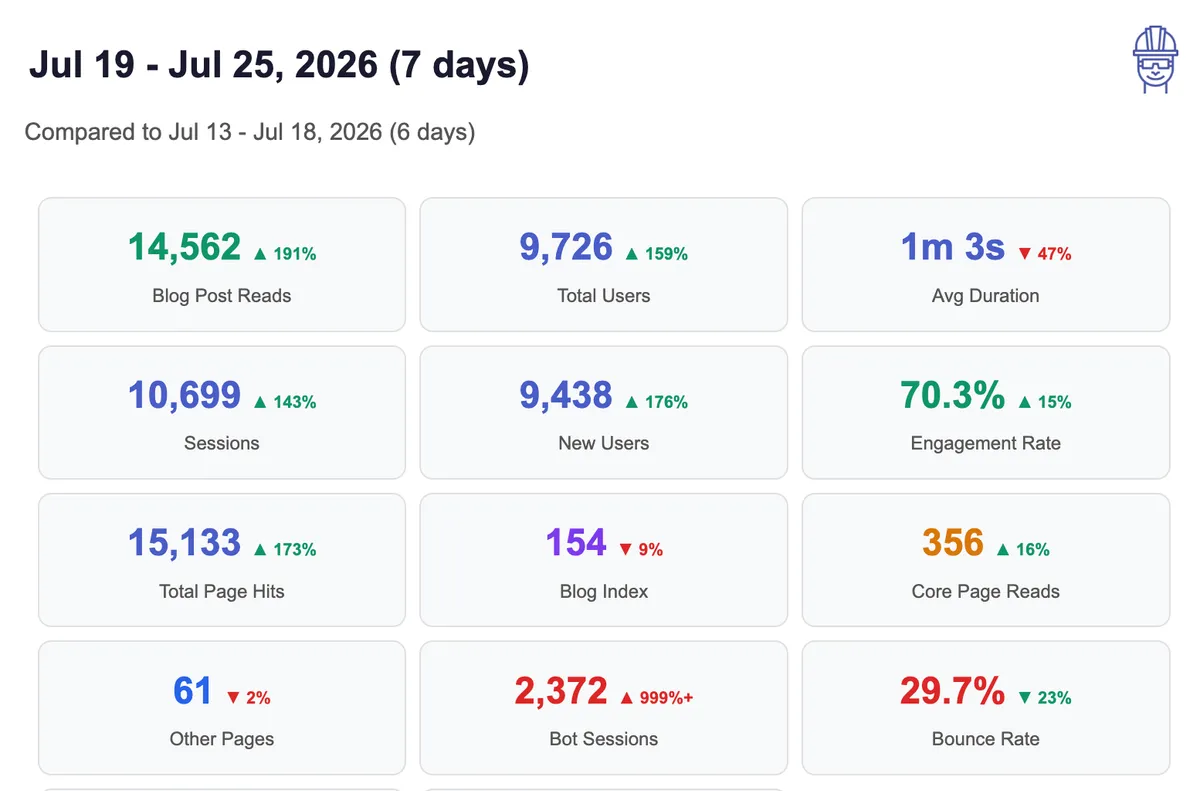
The day after the blocking took effect, measured against the day before it, the numbers moved in exactly the direction you would hope. Blog post reads fell 29% and total users fell 27%, which sounds like bad news until you see the third number: average session duration jumped 70% to a minute and a half. Losing a third of my audience and having the remainder read for far longer is the clearest evidence I have that what I removed was never reading anything at all.

There is a second payoff that never shows up in analytics. Requests that WAF blocks do not count against a flat rate plan's usage allowance, so every crawler turned away at the edge stops spending the quota I bought for real readers. The first of my three costs, the one that lands on the bill, is the one this actually fixed.
I am under no illusion that this catches everything. Plenty of bots and plenty of views still slide through unlabelled, sitting in my numbers as if they were people, and honestly that is fine. I would rather have a number I know is imperfect and understand why than a number I trust for the wrong reasons.
Why Blocking AI Bots Needs Behavioral Analysis, Not Rules
My conclusion is that my tools are limited. Some unverified bots I can try to block, at the risk of turning away real readers, and some I cannot block at all because they arrive with genuine user agents and genuine browsers. Catching those needs real behavioral analysis: session patterns over time, matching addresses against my own history, and geography, because I saw a stream of agents from Bangladesh, a country that never visits my site. Only the combination of those signals reveals the pattern, and WAF does not do that today, or at least I have not found how. To get there it would need to combine what my analytics know with an understanding of my site structure and my pages.
Summary: Content Creation in 2026
So what should you do about your own site? If the bots are not hurting you financially, living with them is a legitimate choice, but if you want to fight back, I hope my story helped you a bit.
In addition, if you run a site behind CloudFront and want to know where you stand, here is where I would start:
- Move to a CloudFront flat rate plan and put WAF in front of your site, so a bot swarm can never surprise you on the bill and you can see the traffic at the edge.
- Open the AWS WAF AI activity dashboard and see who is really reading you. It is included from the Pro tier up and takes minutes.
- Sanity check your analytics against reality: engagement time versus how long your posts actually take to read, new versus returning users, and how much arrives with no referrer at all.
- Try bot protection with per category actions, blocking the scrapers and monitoring the categories that serve real readers, but treat it as an experiment rather than a permanent wall.
- Do not expect the JavaScript challenge to save you, since a determined agent passes it by sending an ordinary Chrome user agent, and it may break your own automation on the way.
- Then decide, with your own numbers in hand, whether the Business tier challenges and monetization are worth it to you.
My blog's biggest fans are still bots that will not pay a cent, and I have made my peace with not being able to stop them all. Until the tooling catches up, the best any content creator can do is see clearly, keep the bill predictable, and decide for themselves what to let through. That is a smaller victory than I wanted, but it is not nothing.