

Sensitive data ends up in logs. Not because developers are careless, but because production systems are complex and "log carefully" doesn't scale.
This post shows how Amazon CloudWatch Logs Data Protection lets you detect and mask sensitive data before it's written or forwarded, and to enforce this centrally across every AWS account. You'll also get an honest look at the real costs and limitations before you commit at scale.
When CloudWatch Logs Becomes a Security Risk
CloudWatch Logs are essential for understanding what’s happening in production, but in many organizations, they quietly become a security risk. Sensitive data almost inevitably finds its way into logs, and once it does, it can spread across systems.
This rarely happens intentionally. More often, it emerges from normal software evolution. An application may log a request object, a user model, or an error payload to improve debuggability. At the time, the model contained no sensitive fields, so the logging decision seems harmless and even recommended.
Over time, that same model evolves. A new field is added — an email address, an IP address, or another piece of personal data. The logging statement remains unchanged, nothing breaks, and sensitive data begins flowing into logs.
This is how logs become a long-term exposure risk: not through negligence, but through normal development practices. As systems grow across teams and AWS accounts, preventing this kind of drift stops being a developer responsibility and becomes a platform security problem.
Even teams with solid logging guidelines struggle to prevent this class of failure. Guidelines are static, systems evolve, and logging decisions made months earlier are rarely revisited with a security lens.
By the time a security team discovers the issue, sensitive data may already exist across multiple log groups and environments, while making remediation far harder than prevention.
If you want to learn how to write safer and more structured logs in AWS Lambda, check out Ran’s Article on logging best practices.
Stop The Security Issue Before It Spreads
Most logging security controls operate after sensitive data has already been
written. At that point, the data has crossed the trust boundary, entered storage, and often begun propagating to other systems. Effective control must happen earlier, in transit, before persistence. That is where Amazon CloudWatch Logs Data Protection changes the model.
Amazon CloudWatch Logs Data Protection Policies Introduction
Amazon CloudWatch Logs Data Protection Policies solves this problem by shifting the enforcement of sensitive data out of applications and onto the platform itself. It inspects log events before they are even written to CW log streams, detects sensitive data using AWS-managed and custom identifiers, and masks those values before they are stored or forwarded to a 3rd party observability platform (DataDog etc.).
As a result, both CloudWatch and downstream observability platforms receive only sanitized logs.
Every masking action also emits a metric, turning secret leakage into an observable signal instead of a silent failure, all without changing application code or relying on developers to “log carefully.”
The result is security by default: instead of depending on individual teams to get logging right, the platform itself becomes the enforcement point.
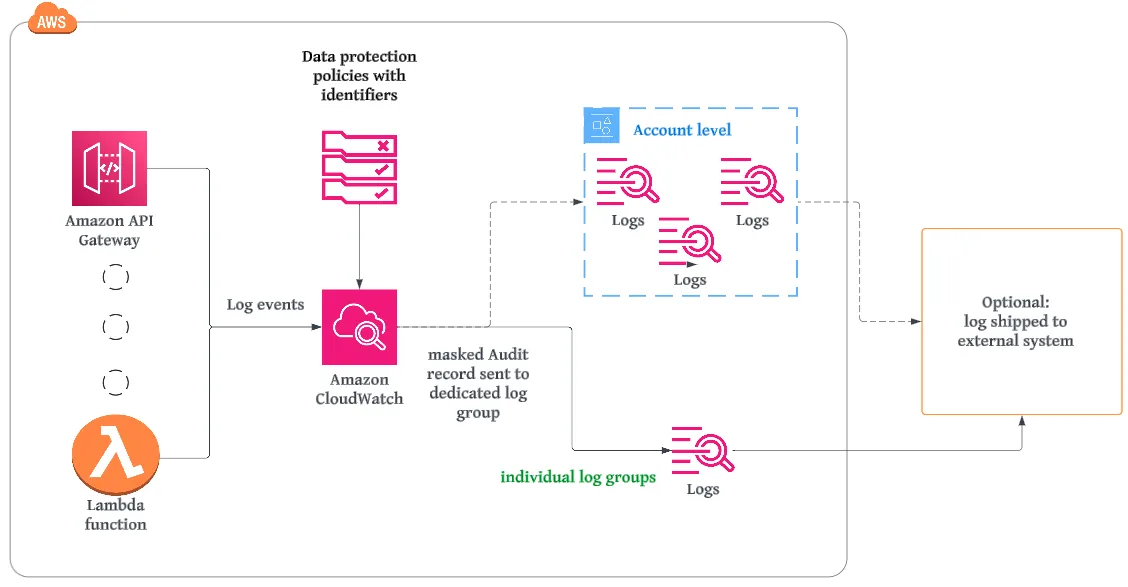
In the diagram above, logs are generated by various AWS services such as Lambda and API Gateway. Any log output (for example, application logs or print statements from a Lambda function) is sent to Amazon CloudWatch Logs.
When CloudWatch Logs Data Protection is enabled, each log event is inspected in transit using the configured data protection policy and its data identifiers. If sensitive data is detected, it is masked before the log is written to the log group.
Let's review how CW detection engines work. The first element is identifiers.
Data Identifiers
Data identifiers are the detection engine behind CloudWatch Logs Data Protection. They define what CloudWatch Logs should look for inside log events to determine whether data is sensitive and how it should be handled.
CloudWatch supports two complementary types of data identifiers: managed and custom.
Managed data identifiers
AWS provides managed data identifiers. They are continuously updated and should not be re-implemented using custom regexes.
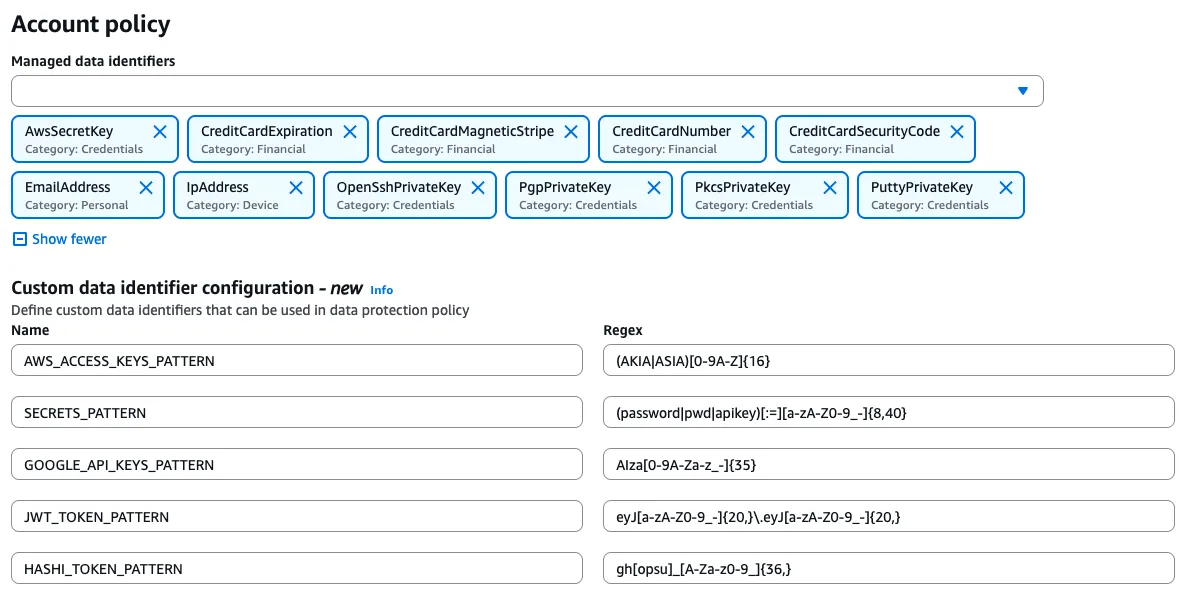
In practice, they cover the most common and most dangerous leakage scenarios. For credentials and private keys, managed identifiers include patterns such as AwsSecretKey, OpenSSH private keys, PGP private keys, PKCS private keys, and PuTTY private keys. These are exactly the kinds of values that cause immediate damage if they ever reach a log stream.
For network and personal data, identifiers like EmailAddress and IpAddress provide standard PII detection without the fragility of home-grown patterns. For financial data, identifiers such as CreditCardNumber, CreditCardExpiration, CreditCardSecurityCode, and CreditCardMagneticStripe provide defensive protection against accidental logging of payment information.
AWS provides many additional managed data identifiers beyond these examples, covering a broad range of credentials, financial, and personal data types.
The key advantage of managed identifiers is their reliability. They are tuned to reduce false positives, handle real-world formats correctly, and evolve as patterns change.
Custom data identifiers
Custom data identifiers exist only to fill the gaps that managed identifiers intentionally do not cover.
Real-world environments often include organization-specific token formats, internal headers, or proprietary secrets that AWS cannot know about. These are the cases where custom identifiers make sense.
The design rule is simple: prefer managed identifiers whenever possible and introduce custom identifiers only when there is a clear, justified gap. This approach keeps policies smaller, intent clearer, and long-term maintenance costs lower.
You Also Get Signals, Not Just Protection
When Amazon CloudWatch Logs Data Protection detects sensitive data, it masks the value before the log event is stored or forwarded. Only the sanitized version is written to the log group and shipped to downstream systems. The original sensitive value never persisted.

Each detection can also generate a CloudWatch metric. These transforms “a secret was logged” into a near-real-time signal that can trigger alerts. Even when an alert fires, the data has already been protected.
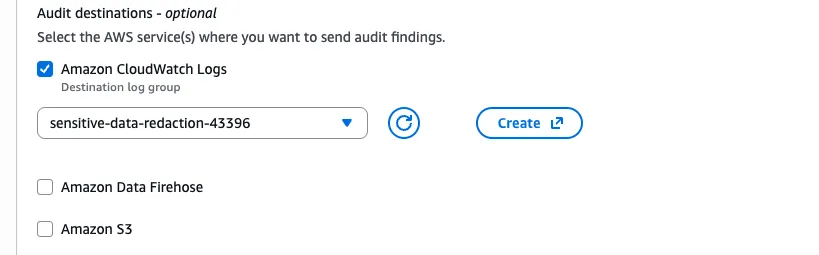
In addition, detections can be written to a dedicated audit destination configured at the account level (such as a separate CloudWatch Logs log group, Amazon S3, or Kinesis Data Firehose). These audit records are not appended to the application log stream.
Audit records include metadata such as:
- Resource ARN
- Matched data identifier
- Number of detections
- Enforcing policy name
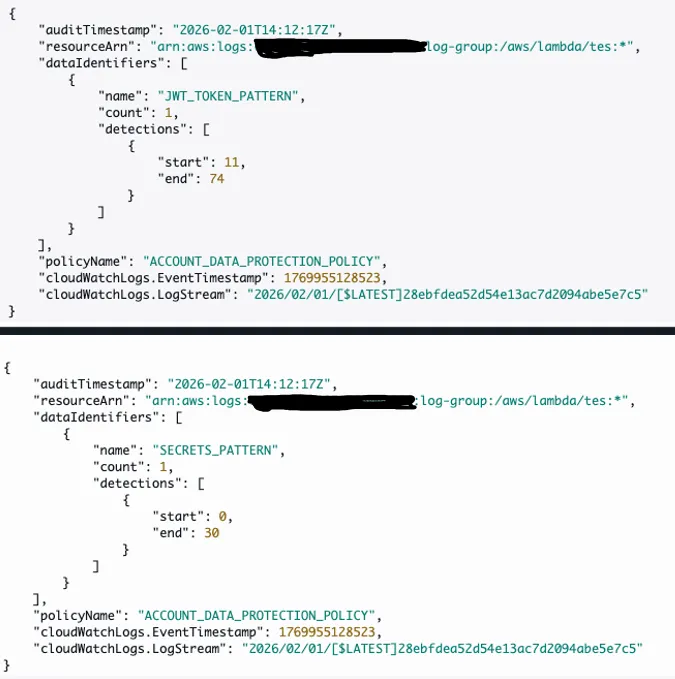
These logs never include the sensitive value itself, providing traceability without reintroducing risk.
Configuration is handled centrally in the account-level data protection policy. Once audit logging is enabled, every detection automatically produces an audit record without any application or per-log-group configuration changes.
The outcome is stronger governance: sensitive data is prevented from being stored in the first place, while metrics and audit logs create a feedback loop that helps teams detect drift and remediate root causes proactively.
Deploying at the Organization Level
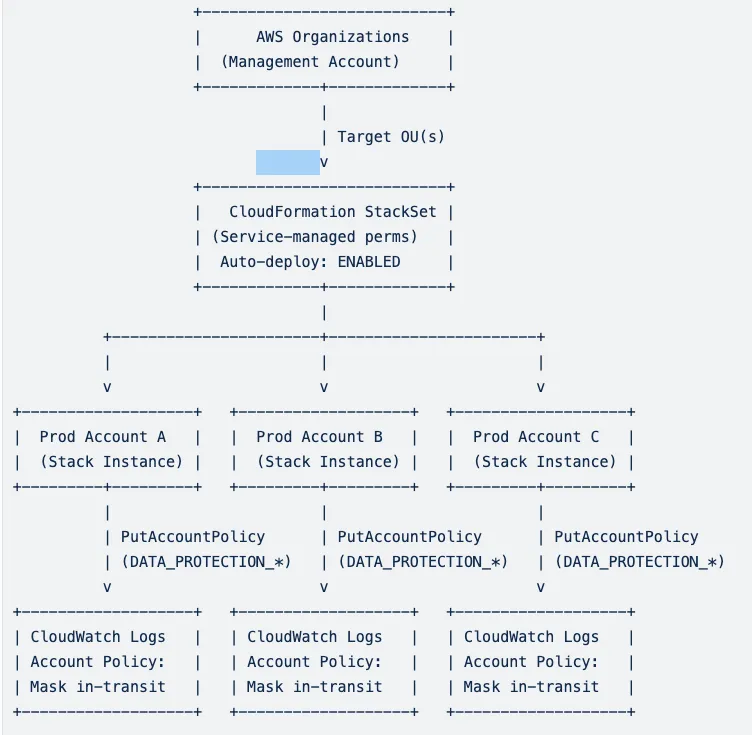
Now that we understand the flow in a single account, let's add organization wide governance into the mix. The objective is a single policy definition enforced everywhere in the AWS organization.
Using AWS Organizations, the policy is applied at the account level via CloudFormation StackSets with service-managed permissions. This allows automatic deployment to all accounts in selected organizational units, including newly created accounts, without drift.
Each account receives the same CloudWatch Logs account-level data protection policy, ensuring consistent enforcement across regions, environments, and teams.
Org-wide rollout flow:
Cost and Limitations
CloudWatch Logs Data Protection is billed per gigabyte of log data scanned. The current cost is approximately $0.12 per GB. Policy size is limited to 30,720 characters, with support for up to ten custom data identifiers per policy. AWS-managed identifiers are not practically constrained for this use case.
Summary
Masking sensitive data before it ever hits storage is one of the highest-ROI security controls you can add to an AWS environment. Observability isn't optional, so safe observability shouldn't be either. As we’ve seen in this post, Amazon CloudWatch Logs Data Protection Policies solves this problem by shifting the enforcement of sensitive data out of applications and onto the platform itself.