

For years, I have been advocating one way to test serverless services. You deploy an ephemeral stack, a temporary copy of the service for each branch, to a real AWS account, work locally in the IDE, and test your code against those deployed resources. I mock only what I want to fail, so the tests exercise my code together with the real services.
Two things pushed me to rethink it. AI agents are unpredictable, and it has become a hard security problem to make sure they cannot touch a real AWS account and cause unexpected damage. On top of that, deploying an ephemeral stack for every branch takes a long time on a large service. So when AWS Emulator came out, I wanted to give it a try.
In this post, you will learn about my experience moving my open-source serverless service to this new open-source emulator, my impressions, the gaps I hit, and my recommendation on whether you should try it for your own services.
Why I Tested on Real AWS Instead of LocalStack or Moto
My serverless testing pyramid guidelines define where each type of test runs. Unit and infrastructure tests run locally with no AWS account, integration tests run from the IDE against resources deployed to AWS, and end-to-end tests exercise the deployed service itself.
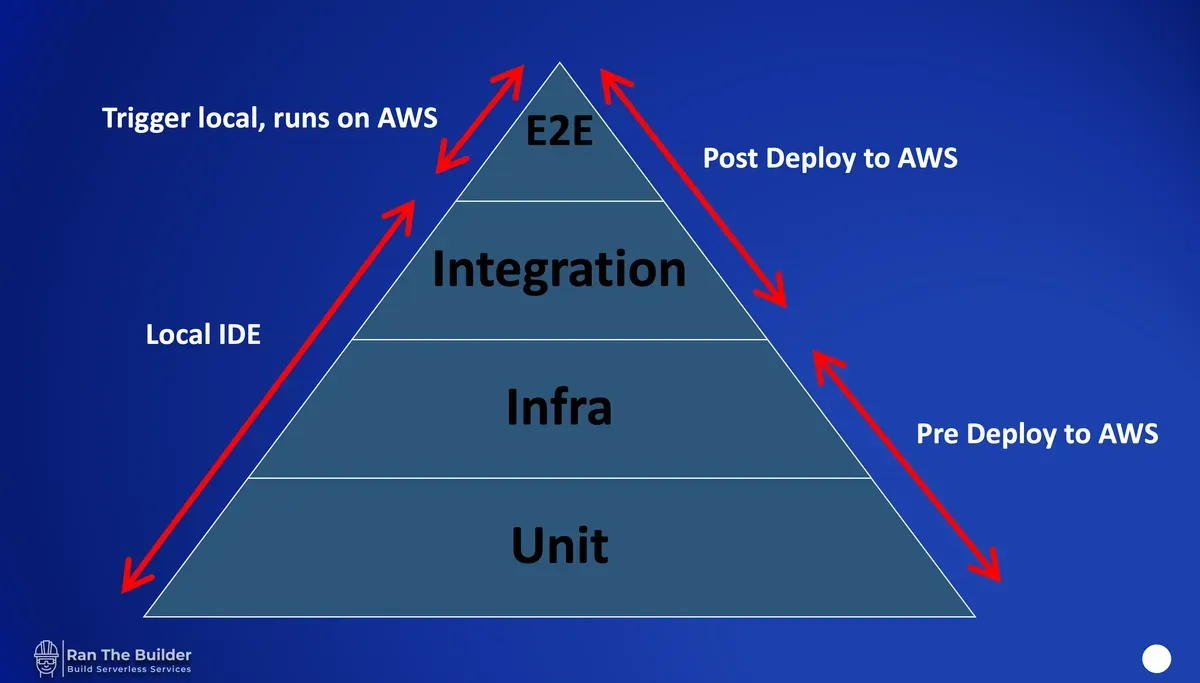
Even against real AWS, I mock some parts in my integration tests, so I can simulate failures that I could not trigger otherwise. I do not want to mock everything, though, because that is a lot of code to write and maintain. Sure, in the days of AI code is cheap, but it is still not worth it.
Local alternatives have existed for a long time, with LocalStack and moto as the best-known examples, and they are good products with large communities. When my team used such tools, though, we encountered bugs and misalignments with the real APIs, and sometimes the tools lagged behind new services and new APIs. That is understandable, because they are not backed by AWS and cannot know when and how new APIs will arrive. Whether AWS Emulator will keep up with them remains to be seen.
I would still use these tools when they fit, though. We had a use case at work where the code had to iterate over an AWS organization with 10,000 accounts. Nobody creates 10,000 accounts for a test, so we used moto and its Organizations support, and it did the job.
What Is AWS Emulator and How Does It Work?
AWS Emulator is an open-source project backed by AWS, which addresses my main concern with the other tools. Its repository describes it like this:
“AWS Emulator is a local emulator of the AWS APIs. You use it to test your software without calling AWS, on your own machine, on a development server, or in continuous integration (CI). You don’t need an AWS account.”
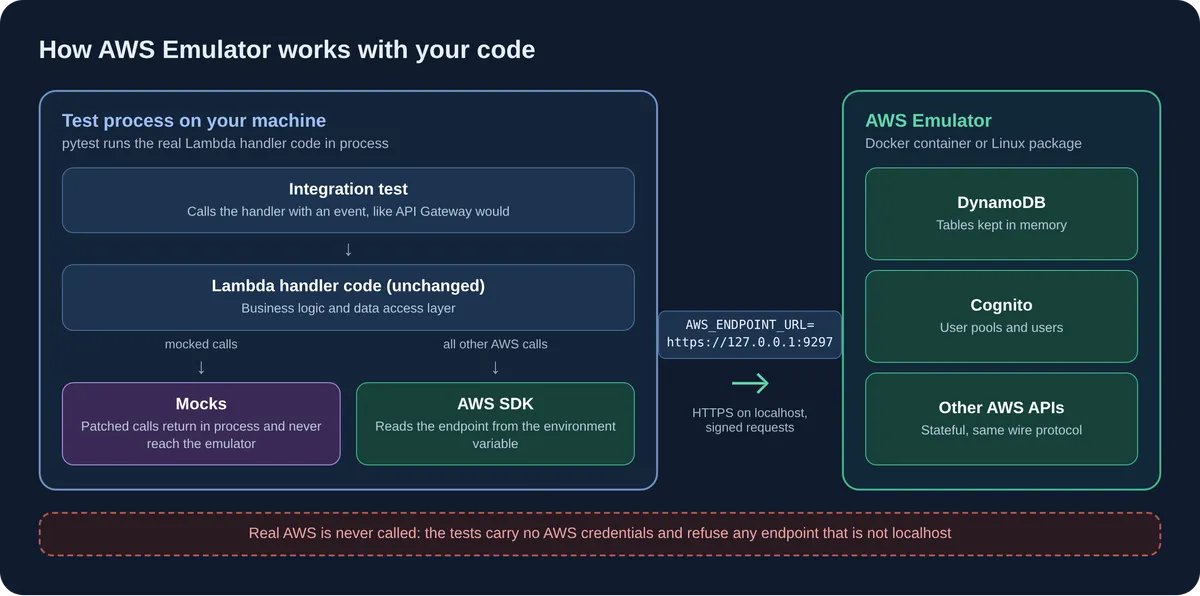
In practice, it is a real HTTPS endpoint that speaks the AWS APIs and keeps state, so a table you create is there when you read it back. On macOS and Windows it runs in a local Docker container, and on Linux, which covers most CI runners, you install it as a Debian or RPM package.
Your code does not change. The tests run the real handler code in process, and the AWS SDK reads the standard AWS_ENDPOINT_URL environment variable, so every AWS call goes to the emulator on localhost and not to AWS. That works with any language that has an AWS SDK. Mocks are still up to you as before, because a mocked call returns inside the test process and never reaches the emulator.
How AWS Emulator Changes the Serverless Testing Pyramid
With the emulator, the pyramid changes in one place. Unit tests still run locally with no AWS account, and now the integration tests do not use an AWS account either. Only the end-to-end tests run against real AWS, and they test all the bits together, including the IAM roles, the policies and the configuration.
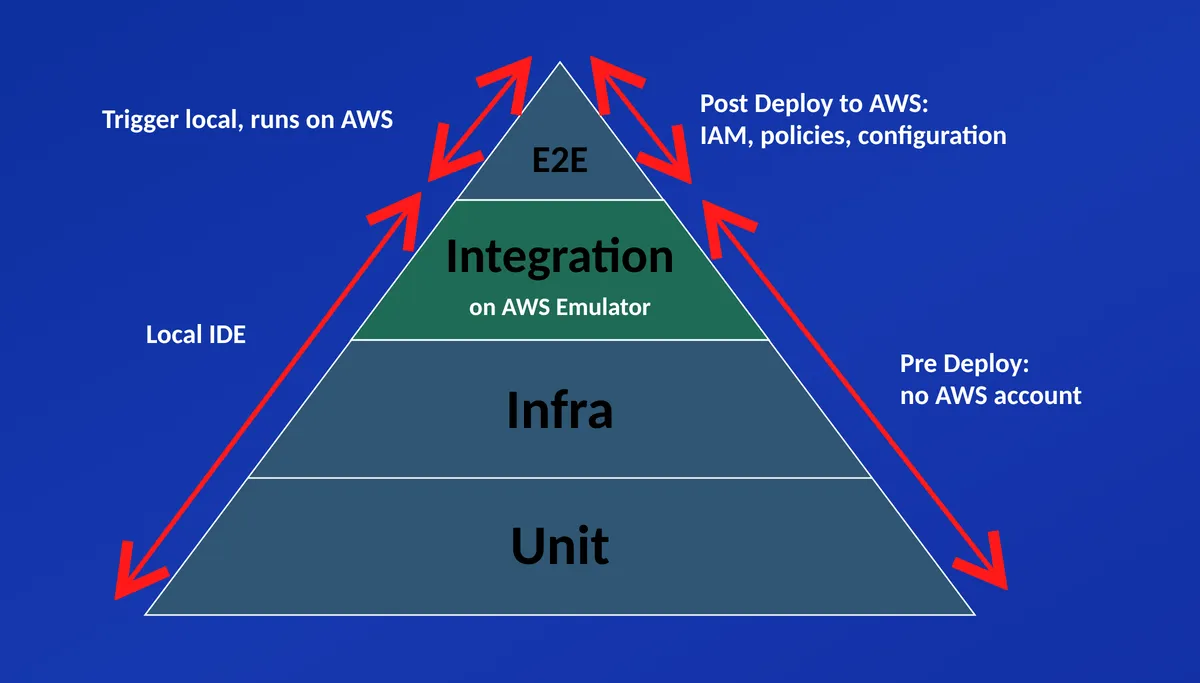
This matters most for AI agents. The emulator does not stop an agent from touching an AWS account, and that is not the point. The point is that an agent that runs with no AWS credentials at all can still write valuable code, test it properly and deliver value, even though it cannot deploy the service. The end-to-end tests run later, in a pipeline that deploys to an AWS account the agent cannot reach.
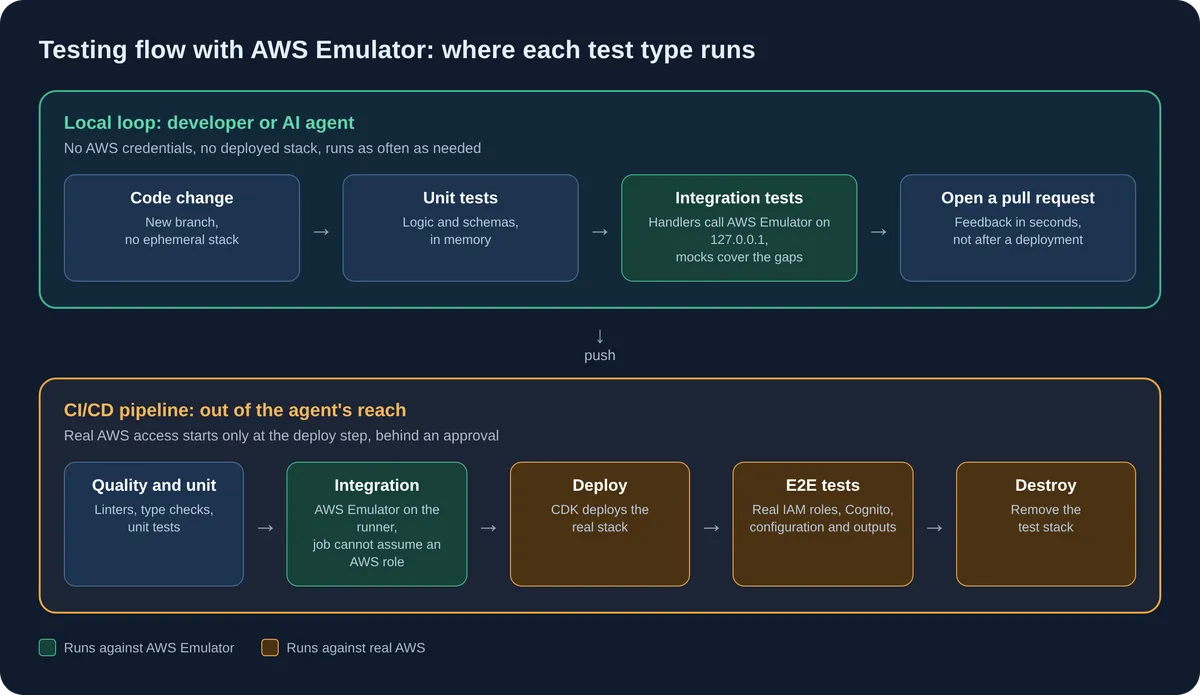
This flow rests on one assumption, which is that the emulator is good enough to trust. Is it? Let's see.
AWS Emulator in Practice: DynamoDB, Cognito and AppConfig
To find out, I tried it on my AWS Lambda Handler Cookbook, an open-source template for production-ready serverless services in Python. It implements a small orders service where API Gateway invokes Lambda functions that store orders in DynamoDB, with Cognito for authentication, AppConfig for feature flags and CDK to deploy it all.
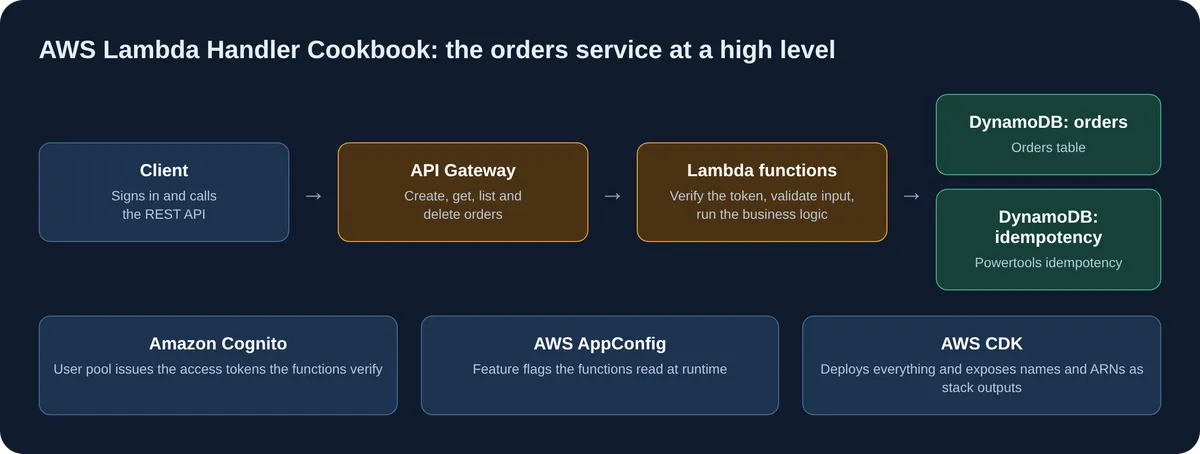
The whole change is in this pull request. It looks big, but most of it is documentation and dependency updates I decided to do while I was at it. Locally, a Makefile target spins up the emulator in Docker. In CI, the emulator is installed as one more dependency, and integration tests now run before the deployment, after they verify that the emulator is running and that they are not connected to an actual AWS account. No test body changed and no Lambda code changed. Only the test setup did.
I wrote a proper spec before touching the code, so my agent and I found the gaps up front and not in the middle of the work. With the setup in place, all 34 integration tests passed on the first full run in about seven seconds, with no deployment to wait for. What was already mocked kept working, and what was not mocked now works locally against the emulator.
To be precise about what this proves, the emulator's real job in my tests is DynamoDB, including the Powertools idempotency layer. My integration tests call the Lambda handlers in process, so the emulator's own Lambda and API Gateway were not exercised. AppConfig was already mocked before, since it is a simple mock, and I kept it that way, while Cognito needed a workaround.
That workaround brings up the most important decision you will make, which is how to test your service when you do not want to wait for a deployment, or when the emulator falls short.
AWS Emulator vs. Mocks vs. Real AWS: Four Testing Options
You have four options, and each one has a different price:
- Deploy to real AWS. No emulator and no mocks, as I did for years.
- Mock everything. Skip the emulator and replace every AWS call with an in-process mock.
- Use the emulator with workarounds. Let the emulator handle what it supports, and write a small workaround for each gap.
- Use the emulator with third-party containers. Replace the weak parts, such as relational databases, with the real engine in a container.
Deploying to real AWS gives you the highest fidelity, because nothing is emulated and nothing is mocked. You pay with the deployment wait on every branch, and with a new problem in agentic development. An agent that writes code has to test it, so it needs to be able to deploy, which means it needs credentials to a real account. That is exactly the security problem I wanted to get away from.
Mocking everything means you need neither a deployment nor an emulator. The tests run anywhere with no Docker and no extra process, and they are fast. The price is the one I described earlier, a lot of mock code to write and maintain, and there is a deeper problem too. A mock returns what you told it to return, so it encodes your assumptions about AWS and not the behavior of AWS, and the tests can stay green while your assumptions are wrong.
The emulator with workarounds is what I did. The emulator handles what it supports, and each gap gets a small workaround. At the time of writing this post, the emulator's Cognito tokens are signed with ES256 instead of RS256, and user pool Lambda triggers are not invoked, so my tests mint their own Cognito-shaped tokens instead. The price is that some code, like downloading the signing keys from Cognito, is now covered only by the end-to-end tests.
The emulator with third-party containers is the answer when a gap is too big for a workaround, and relational databases are the clearest example. I did not try this option myself, and Claude suggested both the gaps and the solution. At the time of writing this post, the open reports describe a SQL dialect that rejects common Postgres features and several other differences in SQL behavior, so ORMs and drivers are likely to fail. The suggested solution is to point your database driver at a real Postgres container and keep everything else on the emulator.
I chose the emulator with workarounds for now, because my service has no relational database and the workarounds are few and small.
You might ask why I accept gaps in AWS Emulator after I passed on other tools for the same reason. It has plenty of them, and its known gaps folder held 6,908 open reports on November 12, 2026. The difference for me is that the gaps are published, fixes are released almost every day, and the project is backed by AWS.
Is AWS Emulator Safe? It Is Built and Managed by AI Agents
The part that made me most curious is how the emulator is built, and Amazon is open about it. In its article about the project, it says that the emulator was written entirely by autonomous agents and that “Our team hasn't written or reviewed any of the code.”
The public repository shows the same picture. Every one of the 2,000 most recent commits, which cover just four days, was authored by an agent or an automation account. One agent runs behavioral checks and files a report when one fails, and another submits the fix.
That pace is impressive, but it raises an uncomfortable question. Am I comfortable installing agent-written code that no human has reviewed and running it on my machine? According to Amazon, every change passes an automated gate where other agents check it for security and coding standards. I decided to run it, but it is a question every team should ask itself.
A few more questions remain that neither the article nor the repository answers. Amazon says the agents verify their fidelity tests against real AWS, but those tests are not published, so how do we know what they cover? When a service launches a new API, how long will the emulator lag behind, and will the service teams trigger an update themselves? I hope AWS publishes an official answer, because it will impact the success of this project and the trust it receives.
Summary: Should You Use AWS Emulator?
Overall, I am super impressed. AWS Emulator replaced a deployed stack in my integration tests with changes to the test setup only, so my agent and I get feedback in seconds, and the agent delivers value without any access to a real account.
My recommendation is to always check the known gaps list first. Create a spec and a plan before you write any code, and check the gaps against what your own repository uses. Maybe I will create a skill for that, or maybe AWS will, if they read this post :)
To get started, you can use my Docker definitions and emulator configuration from the cookbook as a starting point. Keep your end-to-end tests as the final proof, and remove each workaround once the emulator catches up, which at the current release pace might happen sooner than you think.