
In a previous post, I shared my impressions of AWS Lambda Managed Instances, the new compute type that runs your Lambda function on EC2 instances AWS manages on your behalf. That post covered what the offering is, when it makes sense, and the rough edges I hit.
In this post, you will learn how to build the AWS Lambda Managed Instances construct in CDK, using the construct from my AWS Lambda handler cookbook repo as the reference implementation. We will walk through the capacity provider, the VPC and IAM wiring, and how to attach all of it to a real Lambda function, with each section explained line by line.
A Quick Recap: Managed Instances and the Capacity Provider
AWS Lambda Managed Instances is a new compute type that lets you keep your function-based architecture while moving just the hot, steady functions onto EC2 instances that AWS manages for you. Your code runs on EC2 instances you configure but do not manage, and AWS takes care of the instance lifecycle, OS patching, routing, and scaling. The familiar Lambda contract still applies: the fifteen-minute execution limit, your existing IAM and CloudWatch wiring, and your event source integrations. There are two new requirements: your function now runs inside a VPC by default, and you have to wire it to a capacity provider.
So what is a capacity provider? It is a single logical resource that holds the instance family, the memory-to-vCPU ratio, the VPC and subnet selection, and the scaling bounds. When you deploy a Lambda function on this compute type, you attach it to a capacity provider, and AWS uses that configuration to provision the EC2 instances and lay out the execution environments and workers inside them. Multiple functions can share one capacity provider.
Each environment can handle multiple invocations at once via its workers. In Python those workers are separate OS processes that share the environment's memory pool.
For more on Managed Instances itself, including pricing, tradeoffs, and the rough edges, see my impressions and tradeoffs post.
What We're Building
We will add a new Lambda function based on Lambda Managed Instances to my existing AWS Lambda Cookbook template project. The cookbook gives you a cloneable, deployable reference that matches how you'd actually ship this in production:
- Production-ready Python serverless blueprint with CDK
- Five testing strategies: Unit, integration, infrastructure, security, and E2E - CI/CD with GitHub Actions across dev, staging, and production
- CloudWatch dashboards and alarms with SNS notifications
- WAF, Pydantic validation, and idempotent API design
- Feature flags via AppConfig
- Business KPI metrics and tracing with Powertools for AWS Lambda
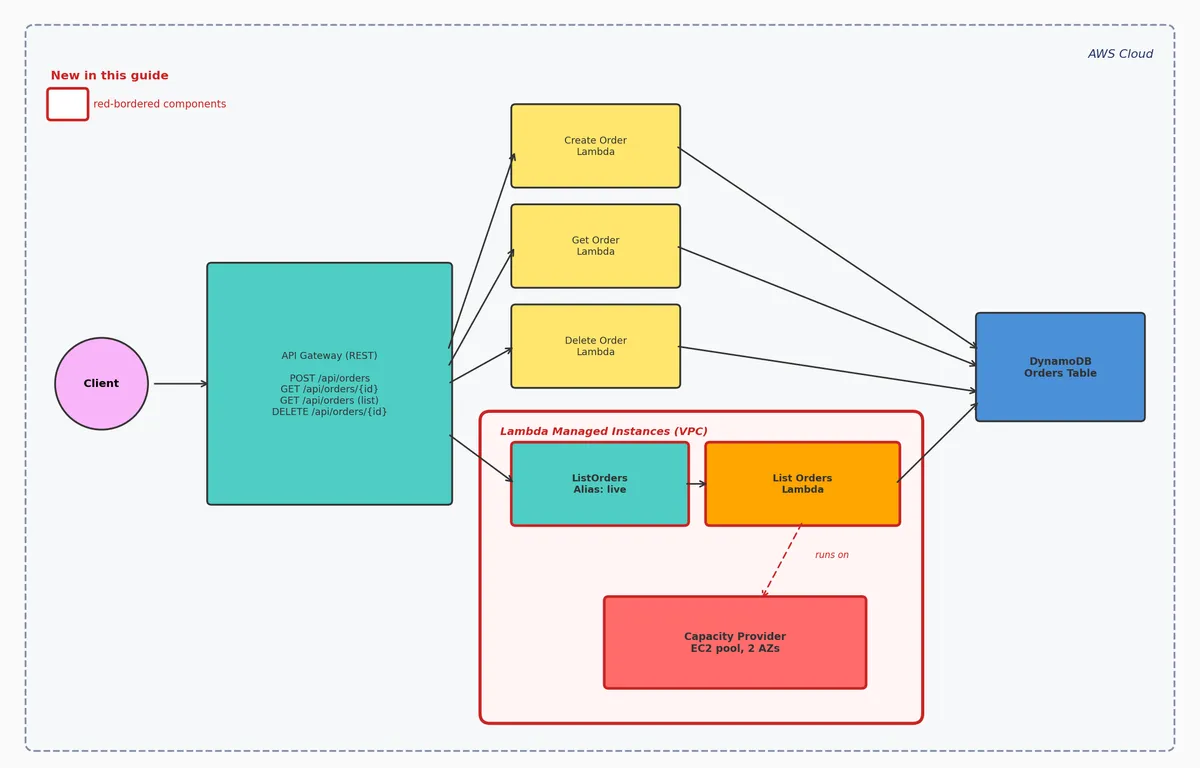
The cookbook stack already has an API Gateway in front of a set of Lambda functions for managing orders.
In this guide we add one new endpoint, an HTTP GET on /orders that lists all orders, and we run the new function on Managed Instances rather than default Lambda.
The diagram below shows the resulting architecture. The components in red borders (the ListOrders alias, the List Orders Lambda function, and the capacity provider inside the Lambda Managed Instances VPC) are the new ones we are adding in this guide; everything else already exists in the cookbook stack.
Building the Capacity Provider
Lines 7 to 16 define the operator IAM role that lets Lambda launch and manage EC2 on your behalf. The managed policy 'AWSLambdaManagedEC2ResourceOperator' grants the EC2 actions Lambda needs.
Lines 19 to 43 define the capacity provider itself with the L1 'CfnResource' (the L2 construct does not yet exist in CDK). The properties wire it to the subnets and security group ('VpcConfig'), the operator role above ('PermissionsConfig'), the instance family ('InstanceRequirements', typically arm64 for cost), and a vCPU ceiling ('CapacityProviderScalingConfig.MaxVCpuCount') that acts as a FinOps guardrail.
Multiple Lambda functions can attach to the same capacity provider, pooling their compute. When you do that, 'MaxVCpuCount' becomes a shared ceiling across all of them, so raise it to accommodate the total demand and use it to stop one misbehaving function from starving its neighbors.
VPC and Networking
Lines 7 to 39 build the VPC ('VpcV2' alpha construct), one private subnet per Availability Zone passed in, a security group (outbound only), and a VPC flow log for debugging.
Lines 42 to 49 add the free DynamoDB gateway endpoint, which saves NAT data processing charges. Gateway endpoints exist only for S3 and DynamoDB; always add one if your function uses either.
Lines 52 to 78 add interface endpoints for CloudWatch Logs and X-Ray. Interface endpoints keep traffic inside AWS but cost roughly $7 to $10 per AZ per month plus data fees, so for narrow workloads a NAT gateway might be cheaper.
The Complete Construct
This is the 'LambdaManagedInstanceConstruct' class with all the parts wired together. The __init__ at lines 13 to 27 orchestrates the build: networking, operator role, and capacity provider. The capacity provider's ARN is exposed as the public 'capacity_provider_arn' attribute that downstream Lambda functions attach to.
The rest of the file is the helper methods we already walked through, plus '_add_flow_log' at lines 112 to 125 for the VPC flow log.
Attaching the Construct to a Lambda Function
Lines 14 to 33 define the execution role: a 'Scan'-only inline policy on the orders table (required to list items) plus 'AWSLambdaBasicExecutionRole'. No 'AWSLambdaVPCAccessExecutionRole' is needed because the capacity provider handles VPC networking.
Lines 58 to 81 define the Lambda function the same way you would for default Lambda. Two details matter: 'memory_size' is 2048 (2 GB, the Managed Instances floor), and the 'architecture' argument must match the capacity provider's, or capacity will not provision.
Lines 86 to 112 are where the function becomes a Managed Instances function. As noted above, the L2 construct does not yet expose 'CapacityProviderConfig' or 'FunctionScalingConfig', so the cookbook drops down to the underlying 'CfnFunction' and adds raw CloudFormation overrides. These link the function to the capacity provider, pick the instance family ('ExecutionEnvironmentMemoryGiBPerVCpu': 2 = C, 4 = M, 8 = R), cap concurrent invocations per environment ('PerExecutionEnvironmentMaxConcurrency'), and set the warm baseline and upper bound ('MinExecutionEnvironments' and 'MaxExecutionEnvironments'). Do not forget the 'add_dependency' call on line 112; without it, CloudFormation will try to create the function before the capacity provider exists.
Lines 115 to 121 close out with an 'Alias' on the published version that API Gateway integrates with. Managed Instances only serves traffic from published versions, so this pattern is not optional.
Deploying and Verifying It
Deploying a Managed Instances function is slower than default Lambda. Plan for cdk deploy to take roughly three to five minutes while the capacity provider provisions its baseline of three EC2 instances. The version-publish step from the previous section is essential: without the 'Alias' pointing at 'lambda_function.current_version', the deploy succeeds but no instances come up, and your endpoint returns invocation failures with no obvious cause. Bake the alias pattern into your pipeline from day one.
If your first deploy fails during init, the most likely cause is 'memory_size' set too low for the cold-boot process footprint. The function never becomes healthy, the deploy hangs, and the instances that launched sit there holding vCPUs. Worse, your CloudFormation stack can end up in ROLLBACK_FAILED, which blocks further changes until you call continue-update-rollback on it manually. Size 'memory_size' with real headroom for init before your first rollout.
Once the deploy completes, check the 'ExecutionEnvironmentMemoryUtilization' and 'ConcurrencyThrottles' metrics on the function in CloudWatch to confirm capacity is healthy and there is no contention.
Summary
Wiring AWS Lambda Managed Instances into a CDK stack is mostly a configuration change on the function plus a capacity provider, plus the IAM and VPC plumbing. The cookbook construct handles the heavy lifting in one place: it builds the VPC, the operator IAM role, the capacity provider, and the VPC endpoints, and exposes a single attribute ('capacity_provider_arn') that downstream Lambda functions reference. The function itself stays a standard Lambda definition, with two raw CloudFormation property overrides that flip it into a Managed Instances function and an alias that fronts the published version.
The four gists referenced through this post (01, 02, 03, 04) contain the full working code, and the merged file lives in the AWS Lambda handler cookbook repository at cdk/service/lambda_managed_instance_construct.py. If you have not already, read the impressions and tradeoffs post first for the why behind everything this guide sets up.